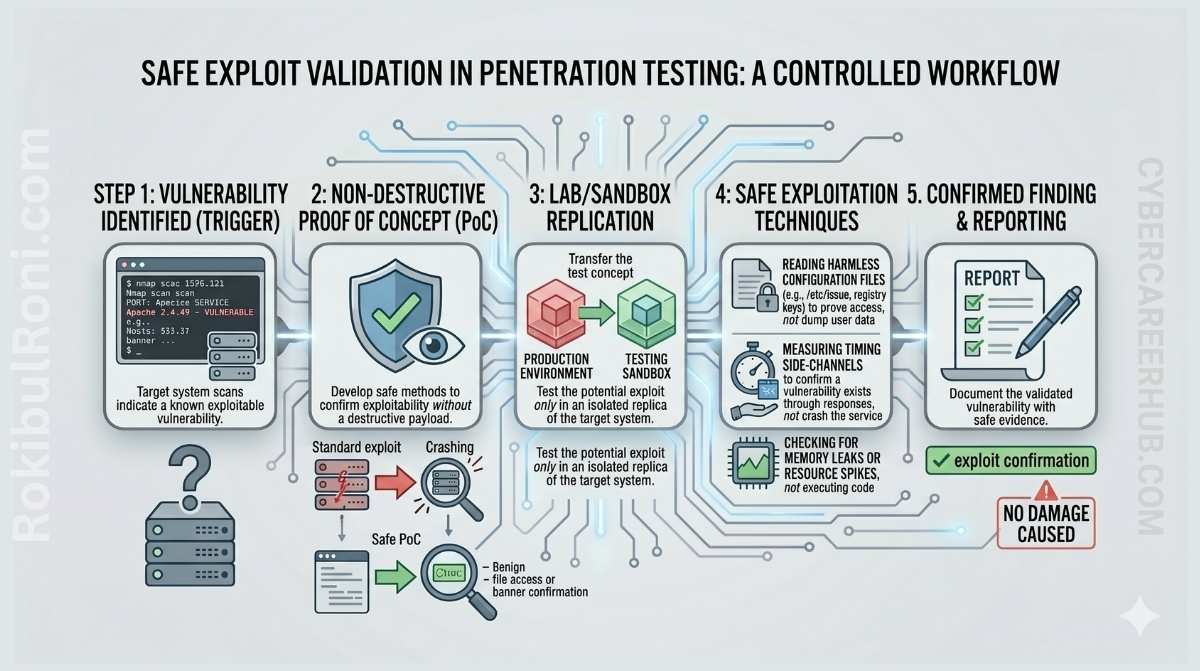
The goal of a penetration test is to reduce risk, not create it. That might sound obvious, but it’s easy to lose sight of when you’re in the middle of an engagement and a promising exploit chain is right in front of you.
Reckless validation — chasing impact further than you need to, touching real customer data, or triggering a production outage just to prove a critical finding — doesn’t make your report more valuable. It makes you a liability. Strong validation proves a finding is real and gives engineers something concrete to fix. It doesn’t require causing the very damage you were hired to assess.
This guide is for controlled, authorized assessments only. Everything here assumes you have explicit written approval covering the systems and methods involved.
Why validation matters in the first place
It’s tempting to treat validation as optional — especially when you’ve found something that looks obviously exploitable. But there’s a real difference between a scanner alert that suggests a vulnerability and confirmed evidence that the issue is actually exploitable in the target environment.
Validation does three things:
- Eliminates false positives. Automated tools generate noise. A validated finding proves the issue is real and exploitable, not just theoretical.
- Clarifies business impact. Showing what can actually happen — not just what a tool claims — gives the report weight that engineers and managers take seriously.
- Enables confident remediation. Developers need reproducible proof to build a fix and verify it worked. Vague findings create vague fixes.
A validated finding is an actionable engineering task. An unvalidated one is a guess.
The principle of minimum necessary proof
This is the most important concept in safe exploit validation: use the least invasive evidence that still confirms the finding. Your job is to demonstrate risk, not realize it.
Think of proof in terms of a hierarchy from safest to riskiest:
- Configuration evidence — a setting, policy, or code path that is clearly insecure, without triggering it at all
- Read-only retrieval — pulling a harmless system identifier, version string, or test record that proves access
- Controlled state change — creating or modifying a test record that your own team owns, with no impact on shared data
- Harmless callback — triggering an outbound connection to a lab server you control, confirming execution without doing anything destructive
- Log correlation — performing an action and confirming it appears in target system logs the way you’d expect
Anything that modifies shared data, affects other users, or degrades service availability sits beyond what you should be doing unless that exact action has been explicitly authorized in writing. “We have authorization to test the application” is not authorization to drop a database table.
Rules of engagement: the non-negotiables
Safe validation is impossible without clear, written rules. This is not a formality — it’s the legal and ethical foundation everything else rests on.
Before attempting to validate any finding, you need clear answers to:
- Is this specific system explicitly in scope?
- Is this validation method approved in the rules of engagement?
- Is the test window confirmed with the system owner?
- Is there a rollback and communication plan if something goes wrong?
- Has the client approved the specific data or system interaction involved?
If any of these are unclear, stop. Get written clarification before proceeding. Verbal approval is not sufficient. “The project manager said it was fine” is not documentation.
Safe validation patterns for common findings
Different vulnerability types call for different evidence strategies. Here’s a practical reference for the most common finding categories:
| Finding Type | Safe Validation Pattern | What to Avoid |
|---|---|---|
| Information Disclosure | Retrieve a system hostname, version number, or test file | Accessing user data, configuration secrets, or application source code |
| Broken Access Control | Use a low-privilege test account to view a test record owned by a high-privilege test account | Accessing, modifying, or deleting real user or application data |
| SQL Injection (Read) | Extract the database version, current user, or current database name | Dumping table lists, user credentials, or any customer records |
| Command Injection | Run whoami, id, or hostname to confirm execution context | Running rm, reboot, or anything that modifies filesystem or system state |
| Cross-Site Scripting | Trigger a non-persistent alert() in your own test browser session | Storing payloads that affect other users; modifying page content |
| SSRF | Request a harmless URL from a dedicated lab server you control | Targeting cloud metadata endpoints, internal admin services, or production infrastructure |
The pattern across all of these is the same: confirm that exploitation is possible without actually exploiting anything of consequence.
When not to exploit
Knowing when to stop is as important as knowing how to proceed. Some situations call for skipping active exploitation entirely and documenting the finding based on configuration review, code analysis, or indirect evidence alone.
Do not attempt exploitation when:
- The system is a fragile production environment with no tolerance for instability
- Authorization is unclear or covers the application generally but not the specific action
- The target contains sensitive health, financial, or personal data that you have no business touching
- The asset is a safety-critical or industrial control system
- The asset is owned by a third party not covered by your agreement
- You don’t have written approval for that exact test method
In these situations, a well-documented finding based on configuration evidence or code review is more professional — and carries more weight — than a rushed exploit attempt that causes a production incident.
Decision table: evidence collection and retesting
Use this as a planning reference before each validation attempt and when scheduling retests after remediation.
| Finding Type | Safe Evidence | What to Avoid | Retest Method |
|---|---|---|---|
| Web and API | |||
| Broken Object Level Authorization | Request/response diffs between roles using test accounts | Cross-tenant data access on real records | Re-run role-based tests against the fixed endpoint |
| Insecure Direct Object Reference | Test records with predictable IDs accessed in controlled context | Cycling real IDs to enumerate live user data | Verify server-side authorization check is now present |
| Reflected XSS | Screenshot of alert() in tester’s own browser | Stored payloads that affect other sessions | Re-submit payload and confirm it is now encoded or blocked |
| Infrastructure | |||
| Missing Patches | Nessus or Nmap version scan output | Running a public exploit module against the live system | Re-scan and confirm patch version is updated |
| Weak TLS | SSL Labs or testssl.sh report output | Performing a downgrade attack against live traffic | Re-run configuration scan and verify protocol support |
| Cloud | |||
| Overly Permissive IAM Role | IAM policy document JSON reviewed with permission analysis | Using the role to access out-of-scope resources | Re-analyze the policy and confirm permissions are scoped correctly |
| Public S3 Bucket | Listing bucket contents if explicitly approved | Reading or writing sensitive files | Re-check bucket ACL and policy; confirm private access configuration |
How defensive experience makes you a safer tester
This isn’t a soft skill point — it’s practical. Testers who’ve worked in SOC, incident response, or forensics roles make better validation decisions because they understand what happens on the other side.
A few concrete ways defensive experience improves offensive work:
- You know what a good detection signal looks like, so you run tests that are easy for the blue team to trace and validate — making your evidence more credible, not less
- You understand evidence preservation and chain of custody, which means your artifacts hold up in formal reporting and audit contexts
- Your remediation advice is grounded in how defensive tools and security operations actually work, not just how the attack works
If you’re building offensive skills from a blue team background, that context is an advantage — use it.
Common mistakes in exploit validation
These are the patterns that turn competent testing into liability:
Chasing impact too far. Running denial-of-service conditions, corrupting data, or taking over admin accounts just to elevate a finding’s severity doesn’t improve the report — it creates a real incident.
Touching real customer data. The moment you access, store, or screenshot actual user records without explicit authorization to do so, you’ve turned a theoretical vulnerability into a real breach.
Ignoring rate limits. Triggering automated blocks, performance degradation, or alerting systems affects real users and real monitoring workflows. It also tips off defenders before you’re done with the engagement.
Proceeding without written approval. “The project lead mentioned it was fine” doesn’t protect anyone legally. If the approval isn’t in writing, it doesn’t exist.
Running unreviewed public exploit code. Public PoC code often includes behavior beyond what’s documented — cleanup routines that damage systems, callbacks to external servers, or payloads with unintended side effects. Always review before running.
Approval and evidence log for high-risk validations
When an engagement involves multiple testers and parallel findings, approvals and evidence can fragment quickly. Keeping a single validation log maintains traceability across technical, legal, and reporting decisions.
| Field | What to Record |
|---|---|
| Finding ID | Unique reference from your report draft |
| Validation Method | Exact method proposed — read-only, controlled change, log correlation, etc. |
| Approval Owner | Name and role of the person who authorized this specific test |
| Approval Timestamp | Date and time authorization was granted |
| Scope Confirmation | Specific assets, endpoints, and environments covered |
| Risk Notes | Known operational concerns before execution |
| Evidence Reference | Screenshot or log IDs linked to your storage location |
| Outcome | Confirmed / Not Confirmed / Partial |
| Retest Required | Yes/No, with owner assigned |
This log becomes essential if anyone — client, legal, or management — later asks how a specific decision was made.
Safe validation checklist: the final gate
Run through this before attempting to validate any finding:
| Check | Status |
|---|---|
| System and method explicitly in scope and approved in writing | ☐ |
| Minimum necessary proof selected — not the most invasive option available | ☐ |
| Using a test account and test data only | ☐ |
| Test window confirmed with system owner | ☐ |
| Contact and rollback plan documented | ☐ |
| Actions reviewed to confirm no impact on other users or services | ☐ |
If any box is unchecked, pause. The goal is to provide clear, actionable proof of risk — not to become a risk yourself.
Retest playbook: closing findings properly
A finding is not closed because a patch was deployed. It’s closed when safe, reproducible evidence shows the risk behavior is no longer present.
Retest sequence:
- Confirm remediation scope and who implemented the fix
- Re-run the original safe validation method — same endpoint, same role, same context
- Verify that the expected denial or control behavior is now in place
- Check for side effects in logs or user workflows
- Update finding status with timestamped retest evidence and tester notes
Retest status model:
| Status | Meaning |
|---|---|
| Passed | Original risk behavior is no longer reproducible |
| Partial | Some controls are fixed; residual exposure remains |
| Failed | Original risk behavior is still reproducible |
| Deferred | Retest blocked by change window or scope constraints |
A “Passed” status with supporting evidence is the end state you’re building toward from the first validation attempt. Treat the approval record, evidence artifacts, and retest outcome as one continuous workflow — not three separate tasks.
Evidence quality standard
Good evidence has five properties that make it useful for engineering and audit purposes:
| Evidence Property | Standard |
|---|---|
| Reproducibility | Another tester can reproduce from your notes in under 15 minutes |
| Minimal impact | Proof does not require destructive actions or cross-tenant access |
| Traceability | Artifacts map to exact request, response, or log entries |
| Context | Includes the role/account used and the exact target component |
| Remediation utility | Makes the fix clear without additional back-and-forth |
Evidence that doesn’t meet this bar makes your findings harder to act on and easier to dismiss. Quality here directly affects how quickly teams fix real problems.
