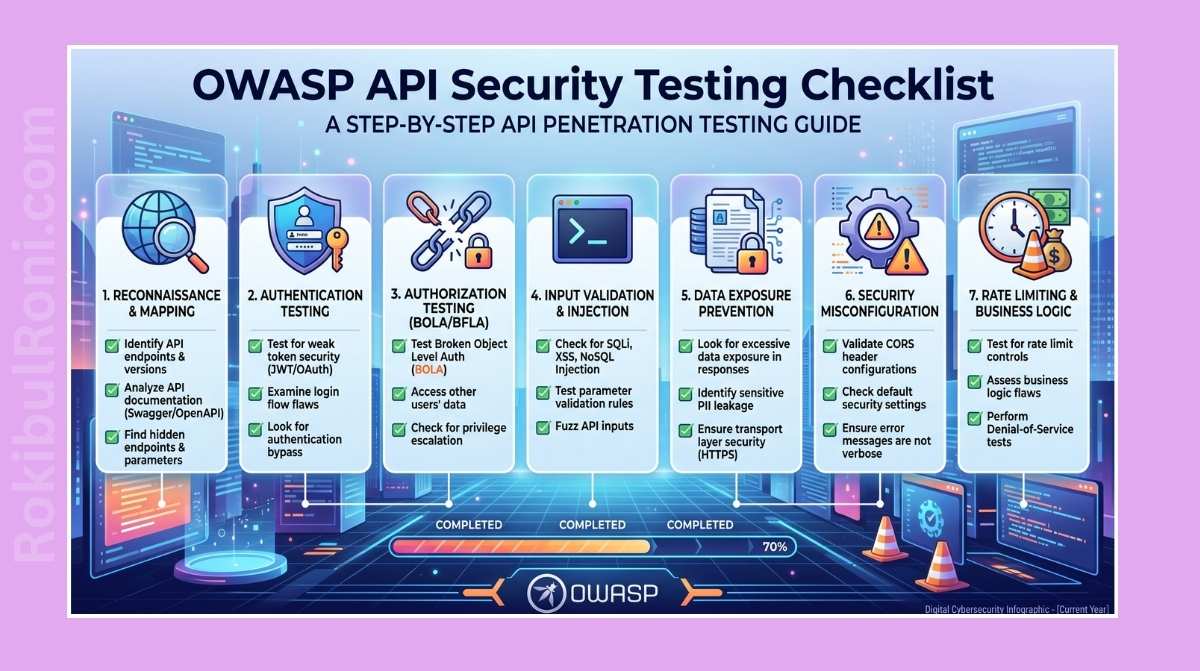
Modern web and mobile applications are built on APIs. They handle login flows, billing, document uploads, business approvals, third-party integrations—essentially everything that matters. Because APIs expose application logic directly to the client, a single weak endpoint can completely bypass frontend controls. When things go wrong, it isn’t just a technical incident. It means unauthorized data access, transaction tampering, and compliance failures that land on engineering leadership’s desk fast.
This guide is a practical, field-tested checklist for authorized API penetration testing. The focus is on methodology, solid evidence collection, clear communication, and remediation guidance that actually improves your security posture—not just a wall of scanner output.
API Pentesting Checklist
Work through this sequence for scoped internal assessments, client-approved engagements, and lab simulations. The order matters—skipping ahead usually creates gaps you’ll regret when writing the report.
1. Scope Definition Before Touching Traffic
Vague scope makes testing noisy, inefficient, and potentially risky. Get everything confirmed in writing before you open a proxy. Here’s what needs to be locked down:
- Base URLs and API Gateways — Clearly separate the target endpoints from the rest of the infrastructure.
- Environment Boundaries — Know exactly whether you’re hitting staging, pre-production, or production.
- Allowed HTTP Methods and Excluded Routes — Specify which paths or methods like
DELETEandPOSTare off-limits. - Authentication Models — Document every auth mechanism in play: sessions, JWTs, OAuth, API keys, mTLS.
- User Roles and Test Accounts — Get credentials for every access level (admin, manager, regular user) so you can test privilege escalation properly.
- Rate-Limiting and Traffic Ceilings — Understand what the servers can handle before you accidentally knock something offline.
- Critical Business Flows — Flag high-risk transactions like payment processing, password resets, and admin approvals upfront.
- Third-Party Integrations — Map external APIs so you don’t end up attacking services owned by other vendors.
Scope Clarification Reference
| Scope Area | What to Confirm | Why It Matters |
|---|---|---|
| API Surface | Base paths, versions, hostnames | Prevents out-of-scope scanning and duplicate effort |
| Identity Context | Test users for each role | Enables proper authorization validation |
| Data Rules | Non-production data use, redaction constraints | Avoids accidental exposure of sensitive records |
| Test Windows | Allowed time and maintenance windows | Reduces operational risk and alert fatigue |
| Traffic Limits | Requests per minute, burst limits | Prevents service degradation during testing |
| Escalation Path | Security contact and on-call owner | Speeds response if behavior looks suspicious |
2. Pre-Test Readiness Checklist
A successful API assessment starts with operational readiness, not tool launches. Make sure the logistical and administrative framework is in place before you start generating traffic.
- Written Authorization — Never start without a signed letter of authorization and agreed-upon rules of engagement. This protects you and the client.
- Key Contacts — Have direct contact details for both technical leads and emergency contacts ready.
- Multi-Role Test Accounts — Verified credentials for every user role you need to probe.
- API Documentation — Request current OpenAPI/Swagger specs, Postman collections, or whatever documentation exists.
- Sample Request/Response Payloads — Working examples save hours of guessing payload schemas.
- Monitoring and Logging Alignment — Coordinate with the SOC or logging team so they can correlate test traffic with alerts rather than being blindsided.
- Emergency Rollback and Incident Response Plan — Establish how to undo data changes and who to call if something goes sideways.
- Infrastructure Backups — Confirm the target environment has recent, restorable backups before you touch anything.
- Exclusion List — Explicitly document third-party dependencies, partner APIs, or shared services that must not be tested.
Go/No-Go Checklist
| Check | Status | Owner |
|---|---|---|
| Authorization and legal approval in place | ☐ | Security Lead |
| Test identities created and validated | ☐ | IAM/App Owner |
| Scope reviewed with engineering | ☐ | Project Manager |
| Monitoring team informed | ☐ | SOC Lead |
| Rollback/contact plan confirmed | ☐ | Ops Lead |
If two or more checks are missing, pause and resolve them before you start.
3. Mapping Against the OWASP API Security Top 10 (2023)
Aligning your testing with the OWASP API Security Top 10 (2023) keeps coverage systematic and prevents blind spots. Use this as a planning reference during assessment design—not as a copy-paste section for your final report.
| OWASP API Risk | Practical Evaluation Focus | Expected Proof/Evidence |
|---|---|---|
| API1:2023 Broken Object Level Authorization (BOLA) | Swap object IDs across different user accounts and tenants. | Request/response pairs showing unauthorized access to another user’s resources. |
| API2:2023 Broken Authentication | Analyze token generation, lifecycle, expiration, and invalidation—including logout behavior. | HTTP history showing weak token complexity or a logged-out token still working. |
| API3:2023 Broken Object Property Level Authorization | Look for overexposed properties in responses, or attempts to modify read-only fields (mass assignment). | Response diffs showing sensitive fields like internal user roles exposed to unauthorized users. |
| API4:2023 Unrestricted Resource Consumption | Test large payloads, deep recursion, pagination limits, and high-frequency request bursts. | Server errors or notable response delays under controlled load. |
| API5:2023 Broken Function Level Authorization (BFLA) | Attempt to call admin or high-privilege endpoints using a low-privilege account. | A role-based access matrix showing successful execution of restricted methods. |
| API6:2023 Unrestricted Access to Sensitive Business Flows | Identify workflows like registration, SMS verification, or checkout that can be abused or bypassed. | Evidence of automated execution or logic bypass in a critical business flow. |
| API7:2023 Server Side Request Forgery (SSRF) | Test URL-accepting inputs to see if the server can be coerced into making internal or external requests. | Server logs or outbound HTTP captures confirming connection attempts from the target. |
| API8:2023 Security Misconfiguration | Check for verbose stack traces, default configurations, weak CORS policies, and missing security headers. | Stack traces or headers exposing system details in the response envelope. |
| API9:2023 Improper Inventory Management | Hunt for undocumented endpoints, legacy API versions, or staging environments exposed to the public internet. | Observed endpoints compared against published API documentation. |
| API10:2023 Unsafe Consumption of APIs | Review how the API sanitizes data received from third-party integrations and upstream services. | Payloads that trigger parser exceptions or logic flaws when passing through external API channels. |
4. Technical Checklist by Control Area
Run through these checks systematically during execution. Don’t skip the “boring” ones—missing headers and error handling are where auditors find things months after a test closes.
Authentication Checks
- Token Validity and Lifecycles — Verify tokens expire correctly, are invalidated on logout, and cannot be reused after expiry.
- Token Cryptography — Confirm JWTs are signed with strong algorithms and that signature validation can’t be bypassed (test the
nonealgorithm). - Recovery and Reset Flows — Check rate limiting, token predictability, and validation logic during password resets and account recovery.
- MFA Enforcement — Ensure endpoints requiring MFA can’t be bypassed by skipping steps or calling downstream routes directly.
Authorization Boundaries (BOLA and BFLA)
- Cross-User Access — Swap ID-based parameters (e.g.,
/user/1001to/user/1002) to confirm users can’t view or modify each other’s data. - Privilege Escalation — Call admin endpoints (e.g.,
/admin/delete_user) using standard user credentials. - Tenant Isolation — In multi-tenant environments, verify resources belonging to Tenant A are completely inaccessible to Tenant B users.
- State-Changing Endpoints — Confirm
POST,PUT, andDELETEactions require proper authorization even when the equivalentGETrequests are public.
Input Validation and Data Parsing
- Schema Enforcement — Verify the API rejects payloads that don’t conform to expected JSON or XML schema.
- Data Boundaries — Test boundary limits, unexpected data types, and special characters to find parsing vulnerabilities.
- Server-Side Validation — Never trust client-side constraints. Test directly through an intercepting proxy to bypass frontend validation.
- Malformed Payload Handling — Confirm the API responds with clean, non-disclosing error codes like
400 Bad Requeston invalid input.
Property Controls and Mass Assignment
- Read-Only vs. Writable Fields — Check if you can inject read-only properties like
is_adminoraccount_balanceintoPUTorPATCHpayloads. - Property Binding — Confirm the API uses strict allowlists rather than blindly binding incoming JSON to backend models.
Resource Consumption and Rate Limiting
- Endpoint Throttling — Test if rate limits are enforced per IP, per session, and per API key across different endpoints.
- Payload and File Size Controls — Try uploading excessively large payloads or files to check for resource exhaustion.
- Pagination Safety — Verify the API imposes maximum limits on list queries—check if
limit=999999is honored or capped.
Data Exposure and Error Handling
- Response Minimization — Review response payloads to confirm they only return fields the client actually needs, not internal IDs, hashes, or PII.
- Stack Traces and Debugging — Verify exceptions don’t leak stack traces, database schemas, or server paths to the client.
- Error Consistency — Confirm error responses use generic messages that don’t reveal usernames, database structures, or system internals.
CORS, Headers, and Platform Controls
- File Upload Security — Validate uploaded files are scanned, type/size-restricted, and stored on isolated servers with non-executable permissions.
- CORS Configuration — Check for overly permissive policies, particularly wildcard origins (
*) combined with credentials access. - Hardening Headers — Ensure headers like
Content-Type,X-Content-Type-Options, andStrict-Transport-Securityare properly set. - Audit Logging — Confirm authentication failures, authorization bypass attempts, and input validation failures trigger secure, centralized alerts.
5. Tooling and Assessment Workflow
Tools automate the repetitive parts, but they can’t replace manual logic analysis. A scanner won’t catch a business logic flaw buried in a multi-step checkout flow.
| Tool | Role in API Security Testing | Operator Insights |
|---|---|---|
| Burp Suite | Primary proxy for intercepting, modifying, and comparing HTTP traffic across user sessions. | Use the Autorize extension or Match and Replace rules to automate multi-role authorization checks. |
| OWASP ZAP | Open-source proxy for automated scanning and passive analysis. | Good for building a baseline of simple configuration flaws and header checks. |
| Postman | Managing API requests, structuring auth flows, and running targeted test suites. | Organize requests into environment-scoped collections to toggle between roles quickly. |
| Browser DevTools | Observing frontend interactions, network requests, and token handling in local storage. | Keep the Network and Application tabs open to watch how the client communicates with the API in real time. |
| Nmap | Scanning open ports and identifying services running alongside the API gateway. | Run targeted, low-intensity scans only against approved hosts. |
| ffuf | Rapid directory, endpoint, and parameter discovery. | Use custom wordlists built for API paths—generic web wordlists miss a lot of common API patterns. |
| Custom Python Scripts | Automating schema validation, bulk requests, or complex logic workflows. | Keep scripts modular and preserve their output logs as evidence. |
Structured Pentesting Workflow
- Reconnaissance and Inventory Mapping — Build a complete map of the API surface using documentation, DevTools, and path discovery.
- Role and Privilege Mapping — Document available roles and prepare baseline requests for each identity level.
- Authentication Verification — Analyze login flows, token generation, refresh mechanisms, and session invalidation.
- Authorization Testing — Run cross-role and cross-tenant tests to surface BOLA, BFLA, and BOPLA issues.
- Input and Resource Exhaustion Testing — Probe how the application handles malicious inputs, oversized payloads, and high-frequency requests.
- Logging and Alerting Verification — Coordinate with the client’s SOC to confirm your test traffic triggered expected alerts.
- Reporting and Handoff — Synthesize findings, document reproducible steps, and provide actionable remediation guidance.
6. Evidence Collection Reference
Finding a vulnerability is only half the job. If you can’t document it clearly enough for a developer to reproduce it and a manager to understand its impact, the finding loses most of its value.
| Vulnerability Class | Testing Focus | Recommended Evidence to Capture | Remediation Direction |
|---|---|---|---|
| Authentication | Token lifecycle, weak secrets, session management. | Full HTTP request/response chains showing expired, forged, or replayed tokens being accepted. | Enforce cryptographically secure session tokens, rotate keys, and apply short token lifetimes. |
| Authorization (BFLA) | Horizontal/vertical privilege escalation. | Side-by-side request diffs showing a low-privilege user successfully executing a high-privilege action. | Apply role-based (RBAC) or attribute-based (ABAC) checks server-side without exception. |
| Object Authorization (BOLA) | Accessing objects owned by other tenants or users. | Request/response payloads where changing an ID exposes another user’s private data. | Validate that the authenticated session owns or is authorized to access the requested resource ID. |
| Input Validation | Injection flaws, parser bypass, overflow. | Input payloads triggering database errors, logic bypasses, or system commands, plus the target’s responses. | Sanitize, validate, and strictly type-check all incoming data against a defined schema. |
| Mass Assignment | Injection of unauthorized model properties. | Before-and-after comparison of object state after updating with injected read-only parameters. | Bind incoming data only to explicitly allowed properties using a DTO pattern or allowlist. |
| Rate Limiting | Automated abuse, credential stuffing, DoS. | Timestamped logs showing hundreds of successful requests in seconds, or absent lockouts on sensitive routes. | Implement token bucket rate limiting per IP, session, and user at the API gateway level. |
| Sensitive Data Exposure | PII, secrets, or internal paths leaked in responses. | Response payloads highlighting unnecessary fields like full credit card numbers or internal role flags. | Enforce data classification and design API responses to return only the fields each client role requires. |
| Error Handling | Information disclosure via diagnostic errors. | Captured stack traces, database messages, or debug logs returned in response to malformed input. | Implement generic error responses; log detailed errors locally in secure backend systems. |
| File Upload | Remote code execution, path traversal, malware delivery. | HTTP logs showing a dangerous file extension (.php, .jsp) uploaded and accessible. | Restrict allowed file types, validate file content type, and store uploads on isolated non-executable storage. |
| CORS and Hardening Headers | Cross-origin attacks, browser sniffing protection. | Response header snapshots showing permissive CORS settings or absent security headers. | Restrict CORS allowed origins, and configure security headers to guide browser behavior safely. |
| Logging and Monitoring | Audit trail completeness and alert coverage. | SIEM dashboard screenshots or log files confirming whether malicious actions were detected. | Log security-critical events (auth failures, privilege checks) with sufficient context: IP, user ID, action. |
7. Writing Actionable Findings
A technically accurate finding is worthless if the engineering team can’t reproduce it or leadership doesn’t understand the business exposure. Standardize your finding format so every issue can be acted on immediately.
Standardized Finding Structure
- Finding Title — Concise and impact-focused (e.g., Broken Object Level Authorization on Order Retrieval Endpoint).
- Severity and CVSS Score — CVSS v3.1 or v4.0 score with the complete vector string.
- Affected Endpoints and Methods — Specific endpoints (e.g.,
GET /api/v1/users/{id}) and HTTP methods. - Preconditions — Authentication state, roles, or configurations required to trigger the issue.
- Proof of Concept (PoC) — A clear, step-by-step reproduction path that’s non-destructive and easy to follow.
- Business Impact — What this means in business terms: financial loss, data breach risk, brand damage, compliance exposure.
- Remediation Plan — Actionable, code-level recommendations for fixing the issue.
- Retest History — A log of validation attempts after developer fixes are deployed.
Practical CVSS and Risk Contextualization
- Keep CVSS Objective — Calculate the base score strictly on technical merits, not perceived business importance.
- Present Business Impact Separately — Document business risks (data sensitivity, regulatory exposure, operational impact) in a separate context section rather than inflating the CVSS score.
- Document Assumptions — If you make assumptions about the environment (like internal network restrictions), state them explicitly in the report.
Example Finding Template
| Field | Description / Example |
|---|---|
| Title | Broken Object Level Authorization on Order History |
| Severity | High (CVSS: 8.1 — CVSS:3.1/AV:N/AC:L/PR:L/UI:N/S:U/C:H/I:H/A:N) |
| Affected Endpoint | GET /api/v2/orders/{orderId} |
| Tested Roles | Standard Authenticated User |
| Proof of Concept | 1. Authenticate as User A and capture the session token. 2. Send GET /api/v2/orders/5021 (owned by User B) using User A’s token.3. Confirm the response returns User B’s order metadata and billing address. |
| Business Impact | Compromises customer confidentiality, risks GDPR violations, and exposes transaction details to any authenticated user. |
| Remediation | Add an ownership check in the order service layer to confirm the requested orderId belongs to the authenticated user’s session before querying the database. |
| Retest Status | Pending Verification |
8. Common Pitfalls to Avoid
These mistakes consistently show up in lower-quality API security assessments. Avoid them and your work will be noticeably better than most.
- Relying solely on automated scanners — Scanners catch low-hanging fruit like missing headers well, but they can’t reason about business logic, multi-step workflows, or subtle authorization boundaries.
- Testing only a single role — Authorization testing requires swapping tokens. If you only test as an admin or only as a standard user, you’ll miss privilege escalation vulnerabilities entirely.
- Ignoring undocumented or legacy endpoints — Older API versions left active for backward compatibility are often unmaintained and lack the security controls added to current versions.
- Neglecting business logic flows — Verify that checkout processes can’t be skipped, MFA steps can’t be bypassed, and approval workflows can’t be short-circuited.
- Capturing vague evidence — A screenshot of an error code without the request payload or response body makes developer remediation much harder than it needs to be.
- Not coordinating with the SOC — Running aggressive scans without informing internal security operations causes alert fatigue and can get your testing IP blocked mid-assessment.
- Reporting out-of-scope findings — Documenting vulnerabilities in third-party provider infrastructure distracts from the agreed assessment targets and can create legal issues.
9. Building a Repeatable API Security Program
A single penetration test is a snapshot. To actually reduce risk over time, you need to move from one-off assessments to a continuous, cyclical program.
Recommended Cadence
| Activity | Objective | Recommended Frequency |
|---|---|---|
| API Inventory Audit | Maintain an accurate registry of all active and legacy endpoints with clear ownership. | Monthly |
| Targeted Testing Sprints | Deep-dive assessments on high-risk features and major application releases. | Quarterly or per major release |
| Remediation Reviews | Track open findings against SLAs with engineering teams. | Bi-weekly for active issues |
| Retest and Verification | Formal retests to confirm fixes actually mitigate reported risks. | Upon fix deployment |
| Detection Engineering Updates | Use findings to sharpen SIEM rules, WAF configs, and alert signatures. | Post-assessment |
Core Metrics to Track
- Vulnerability Distribution — Findings by severity and control area (e.g., BOLA vs. injection).
- Mean Time to Remediate (MTTR) — Average fix time segmented by severity.
- Retest Pass Rate — Percentage of fixes that pass validation on the first attempt.
- Risk Surface Coverage — Percentage of critical APIs that have undergone formal testing in the past year.
Running API security as a quarterly operating rhythm—rather than a one-time compliance checkbox—leads to faster remediation, higher code quality, and genuine trust between security and development teams.
10. Operational Handoff Worksheet
| Workstream | Key Responsibility | First Action Item | Success Indicator |
|---|---|---|---|
| Scope Governance | Security Lead | Define and document all API endpoints, gateways, and testing boundaries. | No out-of-scope assets are accessed during testing. |
| Role and Identity Matrix | IAM / Application Owner | Set up test accounts and permissions for all required access tiers. | A complete role-based testing matrix is validated before testing begins. |
| Evidence and PoC Quality | Pentest Lead | Verify every finding includes reproducible steps and raw request/response pairs. | Developers can reproduce findings without additional support calls. |
| Remediation Management | Engineering Manager | Assign findings to developers with target fix dates based on SLAs. | The central tracker is kept current. |
| Retest Verification | Security QA Owner | Schedule and execute verification tests once fixes are deployed. | Before-and-after evidence is documented and signed off. |
| Detection Feedback Loop | SOC Lead | Update logging rules, WAF policies, and alert triggers using test data. | Security monitors flag simulated attacks successfully. |
Best Practices
- Set a shared schedule — Keep engineering and operations informed of testing windows to prevent false positive alerts and service disruption.
- Centralize evidence — Store raw request/response payloads in a secure repository for auditing and historical reference.
- Standardize finding formats — Enforce a consistent reporting template so all stakeholders receive clear, actionable information.
- Track systemic gaps — Look for trends across findings (recurring BOLA, repeated injection points) to identify where developer training or framework changes are needed.
- Require formal retests — Never close a high-risk finding without verified retest evidence on file.
11. Handoff Artifact Standards
| Artifact | Required Contents | Primary Audience |
|---|---|---|
| Scope Document | Approved URLs, testing windows, user credentials, exclusions, and emergency contacts. | Security and Engineering Teams |
| Execution Log | Timestamped record of endpoints tested, methods used, and outcomes. | Compliance and Audit Stakeholders |
| Vulnerability Package | Detailed finding write-ups with CVSS scores, PoCs, business impact, and remediation paths. | Development Leads and Project Managers |
| Retest and Verification Report | Before-and-after evidence, code change references, and final closure sign-offs. | Security Governance and Compliance |
| Detection and Alert Notes | Logs and suggestions to improve SIEM rules and WAF configuration. | SOC and Detection Engineers |
Quality Gates Before Handoff
- Reproducibility — Can a developer replicate the vulnerability using only the provided proof of concept?
- Clarity — Is the business impact explained in plain language that non-technical leaders can understand?
- Actionability — Are remediation steps specific and concrete?
- Verification — Is the final status of every finding backed by retest evidence?
12. 90-Day Security Program Roadmap
Getting a sustainable API security program off the ground takes three months of focused effort. Here’s a realistic breakdown.
Days 1–30: Establish
- Standardize scoping templates, intake processes, and reporting formats.
- Complete at least one risk-based API assessment focused on critical business flows.
- Launch a centralized remediation tracker with clear ownership and SLA fields.
Days 31–60: Remediate
- Complete formal reviews and begin remediation on all high-risk findings.
- Start the retest and verification cycle to formally close out fixed issues.
- Feed initial findings into developer security training materials.
Days 61–90: Optimize
- Conduct follow-up assessments on updated services and recent releases.
- Compare metrics: vulnerability types, remediation times, retest pass rates.
- Publish lessons learned and define security priorities for the next quarter.
| Program Metric | Why It Matters |
|---|---|
| High-risk finding recurrence rate | Shows whether controls are becoming durable over time |
| Mean time to remediate | Reflects operational remediation efficiency |
| Retest pass percentage | Validates fix quality, not just deployment speed |
| Detection improvement count | Confirms assessments are actually strengthening defenses |
Organizations that treat API security testing as a continuous quarterly cadence—rather than an annual compliance exercise—consistently see faster remediation, fewer repeat findings, and stronger alignment between security and engineering.
