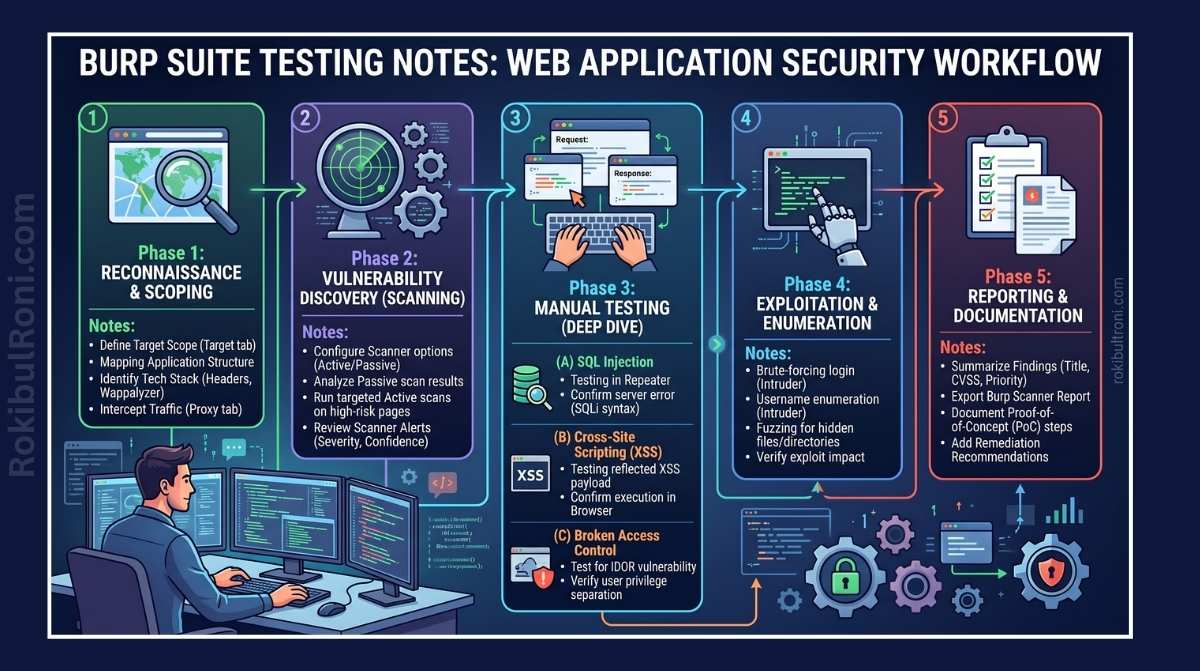
Burp Suite is the de-facto standard for web application security testing, and with good reason — it gives you precise control over every HTTP request flowing between browser and server. But raw tool access only gets you so far. What separates a thorough, defensible penetration test from a noisy hours-long rabbit hole is the workflow behind it: how you set up your environment, how you structure your notes, and how you document what you find well enough that a developer can actually reproduce and fix it.
These notes are meant to be a practical reference — the kind of thing you keep open during an engagement rather than bookmark and forget.
Disclaimer: Everything here is intended for authorized testing only — approved client engagements, internal audits, and controlled lab environments.
1. Project Setup: Laying the Foundation
It’s tempting to jump straight into testing the moment you have a target in scope. Don’t. A ten-minute setup routine up front saves hours of cleanup and confusion later. Polluted proxy history, out-of-scope traffic leaking into your sitemap, and session cookies from your personal browser all quietly corrupt your data — and you won’t notice until you’re deep into writing findings.
Pre-Testing Setup Checklist
- Dedicated Browser Profile: Use a clean browser profile or Burp’s built-in Chromium browser. This isolates your testing traffic from personal accounts, saved passwords, and background tabs that might send noise through the proxy.
- Target Scope Isolation: Lock down
Target > Scopebefore anything else. Burp will happily capture traffic to every third-party analytics, CDN, and SSO provider your target touches — none of which you want cluttering your history. - Sitemap Filtering: Filter the sitemap to show only in-scope items. A clean interface helps you think clearly.
- Structured Notes Layout: Set up dedicated sections in your notes for each user role and endpoint cluster before you start testing. You’ll fill them in naturally as you go.
- Predefined Issue Templates: Agree on severity definitions and finding structures before testing begins. Retrofitting CVSS scores and impact statements at 11 PM the night before a report deadline is not fun.
Environment Verification Table
| Setup Area | Target Verification | Evidence to Keep |
|---|---|---|
| Browser Profile | No cached credentials, history, or active sessions from unrelated domains. | Screenshot of a clean browser or a dedicated browser instance. |
| Proxy Routing | HTTP/S traffic from the target browser flows cleanly through Burp without dropping requests. | Sample proxy history entry showing targeted traffic. |
| Scope Rules | Inclusion/exclusion regex matches your rules of engagement. | Exported JSON or screenshot of Burp’s Target Scope configuration. |
| Sitemap Hygiene | Off-scope domains are hidden or filtered from the Site Map view. | Screenshot of the configured sitemap filter. |
| Note Structure | Templates for endpoint mappings, role matrices, and payloads are ready to use. | A blank, structured note template. |
2. Essential Areas for Manual Security Testing
Automated scanners are good at surface-level, high-volume checks. They’ll reliably catch missing security headers, obvious XSS injection points in form fields, and known CVE fingerprints. What they won’t catch are authorization logic flaws — situations where the application does exactly what it was coded to do, just not what the security design intended.
That gap is where manual testing earns its place.
Authentication & Session Management
- Login & Logout Lifecycles: A surprising number of applications invalidate cookies on the client side without killing the session server-side. Log out, grab the old session token, and try reusing it.
- Cookie Hardening: Check for
Secure,HttpOnly, andSameSite=LaxorStrictflags on session cookies. Missing any of these creates an opening for CSRF abuse or XSS-based session hijacking. - Session Token Rotation: Tokens should change whenever privilege levels change — from anonymous to authenticated, or from regular user to admin. Stable tokens across these transitions are a red flag.
- Account Recovery: Password reset flows are a consistently rich area. Weak token entropy, tokens exposed in
Refererheaders, and predictable recovery questions all show up here more often than they should.
Access Control & Authorization
- Privilege Escalation: Map out the application’s role hierarchy and test every sensitive operation across roles — both vertical (low-privilege user accessing admin functions) and horizontal (user A accessing user B’s data).
- IDOR Testing: Swap out object identifiers — user IDs, record keys, account numbers — in URLs and request bodies. Authorization checks that exist on the frontend but not the backend are surprisingly common.
- API Route Restrictions: Verify that authenticated endpoints actually reject unauthenticated requests at the server level, not just by hiding links in the UI.
Input Validation & Business Logic
- Boundary & Type Constraints: Send unexpected data types, oversized strings, and negative values. The goal is to find where the backend trusts the frontend to have already validated input.
- Workflow Logic: In multi-step flows — checkouts, approval processes, account upgrades — try skipping or repeating steps out of sequence. Business logic flaws are often completely invisible to automated scanners.
- Parameter Tampering: Modify price fields, quantity values, discount codes, or status flags before submitting a request. These findings tend to carry high business impact.
File Uploads & Error Handling
- Upload Restrictions: Test file upload endpoints for path traversal, unrestricted extensions, and executable file uploads. A
Content-Typecheck alone is not sufficient server-side validation. - Verbose Error Messages: Trigger application errors deliberately. Stack traces, framework versions, database schema details, and internal hostnames in error responses are all useful to an attacker and easy to fix.
A note on documentation: log every test case with the exact user role, endpoint, and payload. It takes thirty seconds during testing and saves significant time when you’re writing the report.
3. Best Practices for Core Burp Suite Modules
Think of Burp’s modules as precision instruments rather than fire-and-forget scanners. Used thoughtfully, they give you a surgical view of application behavior. Used carelessly, they create noise, trigger rate limits, and potentially destabilize target systems.
| Burp Feature | Primary Objective | Key Evidence to Capture |
|---|---|---|
| Proxy | Intercept and map live application workflows and traffic patterns. | Baseline request/response logs and annotated flow diagrams. |
| Repeater | Modify and resend individual requests to probe parameter behavior in detail. | Side-by-side snapshots of successful and blocked payloads. |
| Intruder | Perform targeted fuzzing or credential testing within strict rate limits. | Payload results mapped to response lengths and status codes. |
| Decoder | Decode or encode parameter values (Base64, URL encoding, Hex) for analysis. | Decoded values mapped to their corresponding request parameters. |
| Comparer | Byte-level diff between two responses to spot subtle behavioral differences. | Visual diff highlights showing changes in response size or headers. |
| Logger | Chronological record of all requests — including those from extensions. | Timestamps and raw traffic entries showing what was sent and when. |
| Organizer | Group and annotate key request/response pairs for quick reference. | Labeled requests sorted by finding ID or endpoint. |
Operational Safety Guardrails
- Respect the Scope: Before running any active scan or Intruder attack, double-check that your target list contains only approved hosts.
- Throttling: Keep request rates conservative — 2 to 5 requests per second is a reasonable default. If high-volume testing is needed, get explicit clearance from the client first.
- Avoid Destructive Payloads: When testing SQL Injection, never use
DROP,DELETE, orTRUNCATEagainst production databases. UseSELECT-based payloads that demonstrate impact without causing damage. - Stop on Instability: If the application starts returning
503errors or slowing noticeably, halt testing and notify the client’s technical contact. Don’t push through it.
4. Capturing Reliable Evidence
Good pentest findings are reproducible findings. A vulnerability that can’t be demonstrated clearly — with a request, a response, and a step-by-step walkthrough — is a vulnerability that will get pushed to the back of the remediation queue.
Evidence Collection Guidelines
- Full Requests & Responses: Capture the complete HTTP exchange. Cut out credentials, but keep everything else — headers, body, status codes.
- Document Context: Record the user role, privilege level, and exact target URL used. A PoC that only works under specific conditions needs those conditions documented.
- Privacy & Redaction: Mask PII, API keys, and session tokens before dropping anything into a report. This protects your client and is just good practice.
- High-contrast Visuals: Crop screenshots to the relevant area and highlight the vulnerable parameter or error response. A full-desktop screenshot with unrelated browser tabs visible is not a professional deliverable.
| Evidence Type | Best Practice | What to Avoid |
|---|---|---|
| HTTP History | Complete request/response headers and body showing exploitation. | Capturing only the request without the server’s response. |
| Visual Proof | Cropped screenshots with clear highlights on the relevant detail. | Full-screen desktop captures with unrelated tabs visible. |
| Methodology Notes | Exact steps, prerequisites, and payload parameters to trigger the issue. | Vague notes like “endpoint is vulnerable to IDOR” with no supporting detail. |
| PoC Scripts | A clean curl command or Python script to automate reproduction. | Complex undocumented manual click sequences that no one else can follow. |
5. Integrating Burp Suite with the Penetration Testing Toolkit
Burp is the core of most web application assessments, but it’s not the only tool you’ll reach for. A well-rounded testing pipeline supplements Burp’s strengths with specialized tooling at each stage.
| Tool | Integration Strategy | Practical Value |
|---|---|---|
| OWASP ZAP | Secondary passive scanning or alternative parsing engine. | Catches edge-case findings that Burp’s passive scanner occasionally misses. |
| Browser Developer Tools | Monitor DOM state, debug client-side JavaScript, inspect WebSocket frames. | Simplifies tracking dynamic API calls and client-side state transitions. |
| Postman | Import API collections and test endpoints systematically by role. | Streamlines multi-role authentication testing on REST and GraphQL APIs. |
| Nmap | Authorized port and service scans on infrastructure adjacent to the web target. | Reveals exposed admin interfaces, version vulnerabilities, and unexpected open ports. |
Typical Testing Sequence
- Reconnaissance: Walk through user flows in a browser routed through the Burp Proxy. Understand the application before you probe it.
- Analysis: Send interesting or complex requests to Repeater and examine how the server responds to variations.
- API Assessment: Build clean endpoint collections in Postman for systematic multi-role coverage.
- Secondary Checks: Cross-reference findings with OWASP ZAP passive scans.
- Infrastructure Context: Run authorized Nmap scans to check for exposed services running alongside the web application.
6. Writing Clear, CVSS-Backed Findings
A vulnerability finding is only as useful as the developer’s ability to understand, reproduce, and fix it. Technically accurate findings that are written poorly — or without enough context — tend to sit unpatched.
Anatomy of a Solid Finding
- Descriptive Title: Name the vulnerability type and its immediate impact. “SQL Injection in User Profile Update Endpoint” is useful. “SQL Injection” alone is not.
- Exact Location: The affected endpoint, HTTP method, and parameter name.
- Prerequisites: What access is required? An authenticated low-privilege session? A valid email address? Document it precisely.
- Technical PoC: Step-by-step reproduction instructions that another tester can follow cold.
- Impact Statement: Business-level risk, not just technical risk. “Allows reading of other users’ PII” lands differently than “SQLi possible.”
- CVSS Score & Vector: Calculate a context-specific CVSS 3.1 score. Generic scores that ignore environmental factors undermine credibility.
- Actionable Remediation: Concrete, code-level guidance. “Use parameterized queries” is useful. “Sanitize user input” is not.
Finding Template Sample
| Finding Field | Example Entry |
|---|---|
| Finding Title | Broken Access Control: Missing Authorization Checks on Profile Updates |
| Affected Endpoint | PUT /api/v1/users/profile |
| Severity | Medium (CVSS 3.1: CVSS:3.1/AV:N/AC:L/PR:L/UI:N/S:U/C:N/I:H/A:N — Score: 6.5) |
| Proof of Concept | Changing the user_id parameter in the request payload allows modification of any other user’s profile. |
| Business Impact | Unauthorized profile modifications allow attackers to change contact details, potentially enabling account takeovers. |
| Remediation | Implement server-side ownership verification using the authenticated session token — not a client-supplied parameter. |
| Retest Status | Pending Verification |
7. Common Pitfalls to Avoid During Testing
Most testing failures aren’t technical — they’re process failures. These are the ones that show up most often.
- Blind Scanning: Running active scans before understanding the application and confirming scope leads to noisy, hard-to-trace results.
- Messy Project Files: Storing histories from different clients or environments in a single unorganized Burp project is a quick path to cross-contaminated evidence.
- Single-Role Testing: Testing authorization flows from one account entirely misses vertical privilege escalation. Always test with at least two distinct privilege levels.
- Ignoring API Traffic: Modern SPAs route most sensitive operations through background API calls. If your proxy isn’t capturing those — especially from headless browsers or WebSocket connections — you’re missing a large part of the attack surface.
- Weak PoCs: Screenshots of a vulnerable state without the corresponding HTTP request/response pair leave developers unable to reproduce the issue.
- Unverified Scanner Output: Reporting findings directly from automated scanner output without manual verification is a reliable way to include false positives in your report.
- Rate-Limit Violations: Aggressive, unthrottled Intruder configurations can crash targets, trigger account lockouts, and create incidents during client production hours.
- Postponed Documentation: Waiting until the end of an engagement to write notes means losing context, forgetting edge cases, and spending twice as long reconstructing what you found.
8. Daily Security Testing Checklist
A brief daily checkpoint keeps the engagement on track and prevents small oversights from compounding.
| Checkpoint | What “Good” Looks Like | Done |
|---|---|---|
| Scope Verification | All active traffic is directed exclusively at authorized targets. | ☐ |
| Role-Based Testing | Critical workflows tested across at least two distinct privilege levels. | ☐ |
| Evidence Quality | Every identified issue has a request/response transcript and timestamp. | ☐ |
| Drafting Findings | Critical notes, CVSS vectors, and remediation paths written while context is fresh. | ☐ |
| Ops Sync | Client’s SOC or operations team informed of testing activity to prevent false alarms. | ☐ |
| Retest Planning | Clear verification instructions outlined for every patch the client delivers. | ☐ |
9. Burp Note Taxonomy for Faster Reporting
One of the highest-leverage habits in Burp testing is structuring your notes to map directly to report sections. If your notes already match your report template, writing the report becomes an editing task rather than a reconstruction task.
Recommended Tags
[AUTH]: Login behavior, session lifetime, cookie flags, and MFA observations.[AUTHZ]: Broken access control, privilege escalation, and IDOR evidence.[INPUT]: Input sanitization gaps — SQLi, XSS, template injection, and similar.[LOGIC]: Business logic flaws, step-skipping, race conditions.[API]: API endpoint structure, payload variations, and authentication flows.[EVID]: Raw request/response pairs and screenshots earmarked for the report appendix.
Note-to-Report Mapping
| Note Tag | Target Report Section |
|---|---|
[AUTH] / [AUTHZ] | Technical Vulnerability Description, CVSS Calculation, and Impact |
[INPUT] / [LOGIC] | Root-Cause Analysis and Actionable Remediation Guidance |
[API] | Affected Systems, Endpoint Table, and Parameter Lists |
[EVID] | Proof of Concept Walkthrough and Appendices |
10. Coordinating Retests & Validating Patches
Retest coordination fails when the original evidence isn’t linked clearly to the fix. When you reach out to confirm a patch, you should be working from the same HTTP request that demonstrated the original vulnerability — not a close approximation.
| Retest Step | Action Required | Required Artifacts |
|---|---|---|
| 1. Find Original Evidence | Locate the exact request ID, parameters, and payload that triggered the initial finding. | Original request/response from the project file |
| 2. Confirm Patch Status | Verify with the development team that the fix is deployed to the correct environment. | Release version, target host, and deployment timestamp |
| 3. Re-run the PoC | Send the exact reproduction request through Repeater under identical conditions. | Revalidation history with the same user privilege level |
| 4. Check the Response | Verify the vulnerability is no longer exploitable and record the server’s new behavior. | Updated response showing rejection or corrected handling |
| 5. Document the Result | Mark the ticket resolved, partially resolved, or still open — with new evidence attached. | Completed retest note with timestamps and raw HTTP data |
11. Operational Worksheet for Security Engagements
| Workstream | Owner | Immediate Action | Success Criteria |
|---|---|---|---|
| Scope Control | Lead Pentester | Lock target inclusion and exclusion rules before active testing begins. | No out-of-scope requests in the project history. |
| Note Management | Testing Engineer | Apply standardized tags to all observations from day one. | Notes map directly to report findings without gaps. |
| Evidence QA | QA Lead | Review PoCs to confirm requests, responses, and timestamps are complete. | Every drafted finding is backed by reproducible evidence. |
| Client Coordination | Project Manager | Provide test windows and source IPs to the client’s SOC before scanning begins. | Zero false-positive security incident escalations during testing. |
| Patch Validation | Security Lead | Match developer fix tickets directly to original Burp request IDs. | Patches confirmed using the original reproduction steps. |
12. Evidence & Handoff Bundle Checklist
Before closing an engagement, compile a clean, organized package of deliverables for the client and your own QA process.
| Handoff Artifact | Required Contents | Primary Audience |
|---|---|---|
| Burp Project File | Cleaned, scoped project file with annotated and color-coded requests. | Pentest QA Team & Client Engineers |
| Finding Worksheet | Draft write-ups with endpoint details, impact descriptions, and remediation paths. | Report Writers & Product Owners |
| Retest Package | Before-and-after HTTP request logs demonstrating that fixes work. | Security Compliance & Governance Leads |
| Lessons Learned Log | Notes on testing bottlenecks, custom scripts, and unusual architecture quirks. | Pentest Team Leads |
Final Handoff Quality Checks
- Can an independent pentester reproduce every finding using only the saved request IDs and documentation?
- Are all remediation steps specific to the application’s framework and architecture — not generic advice?
- Does every retest record explicitly reference the deployed version of the patched application?
13. 90-Day Burp Workflow Optimization Plan
Building consistent workflow habits takes time and deliberate practice. This phased plan gives you a realistic structure for embedding these practices across an entire team.
Days 1–30: Foundation & Standardization
- Template Baseline: Standardize Burp project configurations, note taxonomies, and evidence naming conventions.
- QA Alignment: Peer-review completed testing files to identify gaps and inconsistencies early.
- Quality Remediation: Address recurring evidence problems — missing response headers, absent timestamps, incomplete PoC steps.
Days 31–60: Depth & Integration
- Role Matrices: Build app-specific privilege matrices into every assessment from the start.
- API Telemetry: Fine-tune proxy configuration to reliably capture background API calls and WebSocket traffic from SPAs.
- Reporting Shortcuts: Connect note tags to your report generation tooling to reduce post-engagement overhead.
Days 61–90: Continuous Maturity
- Standardize Retests: Formalize retest protocols and templates across the organization.
- Assess Blind Spots: Analyze recurring findings to identify gaps in the testing playbook.
- Playbook Updates: Revise internal documentation based on real engagement experiences.
Success Metrics
| Metric | Goal | Why It Matters |
|---|---|---|
| Reproducible Finding Ratio | 100% | Every reported finding has complete, verifiable evidence. |
| Retest Cycle Time | Reduce by 25% | Smoother handoffs and clearer documentation for developers. |
| Scope Deviations | Zero | Protects client infrastructure and keeps testing legally sound. |
| Draft Revision Rate | Under 10% | Initial reports are technically sound and need minimal editing. |
14. Standardizing the Burp Engagement Pack
Consistency across engagements means less cognitive overhead, easier QA, and reports that feel professional rather than ad-hoc. A small investment in naming conventions and directory structure pays off across every subsequent engagement.
Scalable Directory Layout
00-scope-rules/– Approved targets, rules of engagement, and authorized time-window documents.01-test-logs/– Daily notes, hypotheses, and endpoint mapping records.02-findings-evidence/– Subfolders per Finding ID containing request/response logs and annotated screenshots.03-patch-validation/– Before-and-after retest evidence, deployment timestamps, and version references.
Standardized Naming Conventions
| File Type | Naming Pattern | Example | Why It Matters |
|---|---|---|---|
| HTTP Request/Response | [FND-ID]_[action].[req/resp].txt | FND-03_get-user-profile.req.txt | Developers can locate the exact payload immediately. |
| Browser Screenshot | [FND-ID]_[description].png | FND-03_idor-dashboard.png | Provides visual context that text alone can’t convey. |
| Project State | [YYYY-MM-DD]_[project-name].burp | 2026-05-22_client-portal.burp | Enables the team to reproduce the testing environment exactly. |
Minimum Evidence Requirements per Finding
For every vulnerability identified, ensure your notes contain:
- Target Context: Complete URL, path, HTTP method, and testing environment.
- Access State: The user account and privilege role used to trigger the issue.
- PoC Payload: The minimal HTTP request required to reproduce the behavior.
- Impact Proof: Specific fields or status codes in the response that demonstrate exploitation.
- Expected vs. Actual: One sentence comparing what the application should have done with what it actually did.
Verification Protocol
- Re-run the exact HTTP request used to demonstrate the finding.
- Record the new response status and payload, and compare it with the original baseline.
- Verify that the fix doesn’t silently break other authorization checks or introduce regressions elsewhere.
