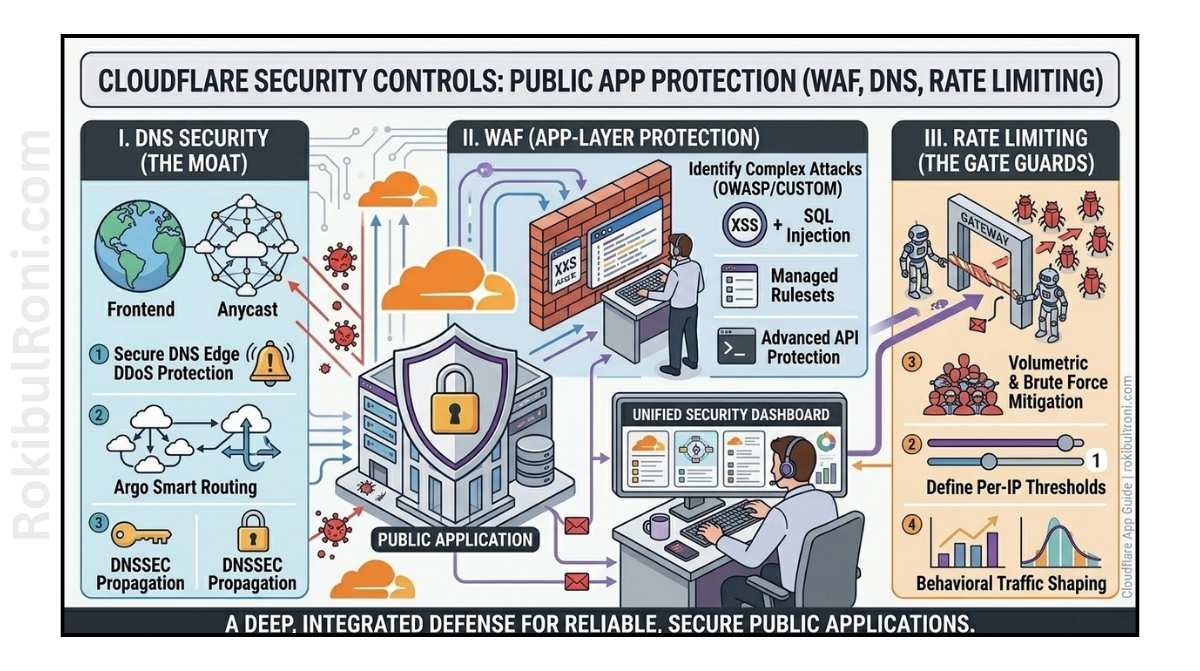
If your app is reachable from the internet, it’s already being scanned. Automated bots don’t care about your company size or how much traffic you get — they just hit every IP and domain they can find, looking for weak spots. A small SaaS app, a personal portfolio with a contact form, a startup API — all of them get probed constantly.
Cloudflare can significantly reduce your attack surface at the edge, but only when you actually configure it properly. Enabling Cloudflare and calling it done is one of the most common mistakes teams make. Proxying your DNS through Cloudflare is a starting point, not a finish line.
This guide walks through the controls that matter most for public-facing apps, what to configure first, and how to keep things from drifting into a false sense of security over time.
Why edge controls matter (and what they can’t do)
Edge security reduces the volume of malicious traffic that ever reaches your origin server. Good WAF rules block SQL injection attempts before they hit your database layer. Rate limits stop credential stuffing attacks from burning through your login endpoint. Proper TLS settings prevent sessions from being downgraded or intercepted in transit.
What Cloudflare can’t do is fix a vulnerable application. If your app has an authentication bypass or an unpatched dependency, edge controls slow attackers down — they don’t stop them. The right mental model is defense in depth: Cloudflare handles the edge, and your application and infrastructure handle the rest.
Start with the controls that close the biggest gaps
Not everything needs to be configured on day one. Focus first on the controls that have the highest risk-reduction payoff:
- DNS hygiene and origin IP protection — if attackers find your origin IP, they bypass your edge entirely
- TLS mode and HTTPS enforcement — weak TLS settings undo the security value of proxying through Cloudflare
- WAF managed rules — broad protection against common web attack classes with minimal configuration effort
- Rate limiting on auth and API paths — login pages and password reset flows are constant brute-force targets
- Logging integration — you can’t detect or respond to attacks you can’t see
Everything else builds on top of these foundations.
The full control picture
Here’s a reference view of what each control actually protects against and how to think about using it:
| Control | Threat It Reduces | Key Usage Note |
|---|---|---|
| DNS Hygiene | Domain takeover, stale record abuse, misrouting | Remove unused records monthly; document ownership |
| Proxy Enablement | Direct origin exposure and bypass attempts | Proxy all public app records; verify origin isn’t reachable directly |
| TLS Configuration | Session interception, weak crypto, HTTPS downgrade | Enforce Full (Strict) mode; test before enabling HSTS |
| WAF Managed Rules | Known web attacks — SQLi, XSS, path traversal | Enable baseline rules, then tune based on false positive rate |
| Custom WAF Rules | App-specific abuse not covered by generic rule sets | Protect sensitive paths with targeted logic; document every rule |
| Bot Protection | Credential stuffing, scraping, automated API abuse | Apply progressive challenges on sensitive endpoints |
| Rate Limiting | Brute force, API burst abuse, resource exhaustion | Set per-endpoint thresholds based on business function |
| DDoS Protection | Traffic flood attacks at edge and application layers | Keep baseline protection active; plan for origin scaling |
| Security Headers | Browser-side exposure, weak client-side controls | Standardize header policy; validate against app behavior |
| Zero Trust Access | Unauthorized access to admin portals and internal tools | Require identity-based access for any non-public admin surface |
| Log Integration | Delayed detection, poor incident response visibility | Export to SIEM; normalize fields for triage workflows |
DNS and origin protection: where most incidents start
A surprising number of public-app compromises trace back to DNS and origin exposure issues that seem minor until they’re not.
On DNS hygiene: Keep your authoritative records documented with clear ownership. When a service gets decommissioned, the DNS record pointing to it often lives on — sometimes pointing at infrastructure someone else now controls. Dangling CNAME records are a real and underappreciated attack vector. Do a record audit monthly if you’re actively building, and quarterly if you’re in maintenance mode.
On origin exposure: The whole point of proxying through Cloudflare is that your origin IP stays hidden. But if your origin IP has been exposed historically (through old DNS records, mail server headers, SSL certificate transparency logs, or misconfigured services), attackers can find it and hit your origin directly — completely bypassing your WAF and rate limits.
After you proxy through Cloudflare, verify that your origin is not reachable from the public internet on ports 80 and 443. Your origin’s firewall should only allow inbound traffic from Cloudflare’s IP ranges.
TLS: get this right before anything else
TLS configuration is one of those settings where “close enough” isn’t good enough. If you’re using Cloudflare in Flexible mode (the default for many setups), traffic from Cloudflare to your origin is unencrypted — which defeats much of the security benefit.
What to aim for:
- Set Cloudflare encryption mode to Full (Strict) — this validates the certificate on your origin server
- Enable Always Use HTTPS so HTTP requests are automatically redirected
- Enable HSTS with a reasonable max-age after you’ve confirmed your HTTPS setup is stable
- Disable older TLS protocol versions (TLS 1.0 and 1.1) through Cloudflare’s TLS settings
Roll strict settings out gradually. Enabling HSTS with a long max-age before you’re confident in your setup can cause outages that are painful to recover from.
| Check | Why It Matters |
|---|---|
| Full (Strict) encryption mode | Prevents unencrypted origin traffic |
| Always Use HTTPS enabled | Ensures no plaintext exposure for any user |
| Certificate lifecycle monitored | Expired origin certs break Full Strict mode |
| HSTS configured deliberately | Locks browsers into HTTPS — test before enabling |
WAF: start broad, then get precise
Cloudflare’s managed WAF rules give you immediate protection against common web attack classes — SQL injection, cross-site scripting, path traversal, and more — without requiring you to write every rule yourself. Enable the Cloudflare Managed Ruleset and the OWASP Core Rule Set as your baseline.
The first week, run them in log-only mode (or watch your challenge/block rates closely) and identify any false positives before switching to active blocking. False positives happen most often on:
- APIs that send unusual but valid payloads
- Search functionality with complex query parameters
- Admin tools with rich form inputs
For these, create narrow exceptions scoped to the specific path and rule — not broad exceptions that cover your entire domain.
Custom rules are where you add app-specific protection:
- Restrict HTTP methods on sensitive endpoints (your
/api/usersendpoint shouldn’t accept DELETE from anonymous users) - Block or challenge access to admin paths from countries or ASNs you don’t serve
- Protect known high-risk routes from prior incidents with targeted logic
Every custom rule should have a clear abuse case it addresses, an owner, and a review date. Rules without these decay into noise that nobody wants to touch.
Rate limiting: one size does not fit all
A single global rate limit is better than no rate limit, but it’s far from ideal. Login endpoints, password reset flows, and write APIs have very different risk profiles and tolerance for burst traffic.
| Endpoint Type | Risk | Recommended Approach |
|---|---|---|
| Login / Authentication | Credential stuffing, brute force | Tight limits (e.g. 5 attempts per minute per IP) with progressive challenges |
| Password Reset | Account takeover via reset abuse | Very strict limits with additional identity signals |
| Public Search / Read APIs | Scraping, resource exhaustion | Moderate limits with bot-score-based escalation |
| API Write / Mutation Endpoints | Automated abuse, data integrity attacks | Low burst tolerance with per-client controls |
| Admin Panels | Unauthorized probing, high-impact actions | Extremely restrictive access plus identity gates |
Review your rate limit thresholds after significant traffic events — marketing campaigns, product launches, or viral moments can spike legitimate traffic patterns and cause your limits to fire on real users.
Keep origin hardening in place
It’s easy to treat Cloudflare as a security silver bullet once it’s running and blocking things. Don’t. Edge controls reduce noise and handle first-contact attacks. Your origin still needs to handle everything correctly.
That means keeping authentication and authorization logic solid at the application layer, maintaining proper session handling, patching dependencies on schedule, and managing secrets properly. Cloudflare can block an attacker’s probing — it can’t fix an authentication bypass they already discovered.
Logging: from visibility to response
Cloudflare generates useful security telemetry, but it only becomes actionable when it’s integrated into your broader detection and response workflow.
At minimum, you want:
- Edge event logs exported to your SIEM or log storage with reliable retention
- WAF block/challenge events normalized with consistent field names (IP, path, method, rule ID, action, timestamp)
- Correlation between Cloudflare events and your application and auth logs
The distinction that matters in IR: a Cloudflare block tells you an attack was attempted. A correlated block — where you can see the edge blocked it and the application received no impact — confirms you were protected. Without correlation, you’re guessing.
| Field | Why IR Teams Need It |
|---|---|
| Timestamp (UTC) | Timeline integrity across log sources |
| Host / Path / Method | Identifies which service was targeted |
| Action Taken | Shows whether the attack was blocked, challenged, or allowed |
| Rule ID | Maps the event back to specific control logic |
| Client IP Context | Supports source pattern analysis and blocking decisions |
| Correlated Backend Signal | Distinguishes blocked probes from successful impact |
Common mistakes that undercut Cloudflare’s value
These come up constantly in real deployments:
- Origin IP still exposed after enabling proxy — the most critical gap; attackers who find it bypass everything
- Flexible TLS mode for convenience — leaves origin traffic unencrypted
- No endpoint-specific rate limits on auth paths — login endpoints become brute-force targets
- Admin panels left public without Zero Trust or identity-based access controls
- WAF enabled but never tuned — false positives pile up, get excepted, and protection degrades
- Stale rules and exceptions with no owner or review date — rule sprawl that nobody wants to audit
- Logs available but disconnected from detection and response workflows
Keeping these in check requires discipline, not complexity. A monthly origin exposure check, a quarterly rule review, and TLS posture validation after infrastructure changes catch most drift before it becomes a problem.
Cloudflare hardening checklist
Use this as your acceptance bar before considering an app’s edge security baseline complete:
| Control Area | Checklist Item | Done |
|---|---|---|
| DNS Governance | Stale records removed; ownership documented | ☐ |
| Origin Protection | Origin not directly reachable from public internet | ☐ |
| TLS Posture | Full (Strict) mode enabled; HTTPS enforced globally | ☐ |
| WAF Baseline | Managed rulesets enabled and actively monitored | ☐ |
| Custom Rules | Sensitive routes protected with app-specific logic | ☐ |
| Rate Limiting | Auth, API, and admin endpoints have tailored limits | ☐ |
| Access Control | Admin surfaces protected with identity-based controls | ☐ |
| Logging | Edge and security logs exported with normalization | ☐ |
| SIEM Correlation | Edge events linked to application and auth telemetry | ☐ |
| Governance | Rule ownership, review cadence, and exception tracking active | ☐ |
30-day implementation roadmap
You don’t need to do everything at once. This sequence gets the highest-value controls in place first.
Week 1 — Visibility and baseline Inventory your public DNS records and identify which are proxied through Cloudflare. Validate that your origin is not reachable directly. Document the top endpoints by risk exposure.
Week 2 — Core protection Tighten TLS to Full (Strict) mode and enforce HTTPS. Enable managed WAF rulesets and watch for false positives. Add custom rules for your highest-risk paths.
Week 3 — Abuse controls and access hardening Implement endpoint-specific rate limits on auth and API paths. Protect admin interfaces with identity-based access. Validate bot-abuse handling on login and registration flows.
Week 4 — Detection and governance Complete log export and SIEM correlation. Define your review cadence for rules and exceptions. Document the operational runbook for Cloudflare change management.
Keeping controls healthy over time
Edge security degrades without maintenance. The tuning you did in week one doesn’t stay correct as your application evolves, your traffic patterns change, and Cloudflare releases new capabilities.
A few discipline habits that prevent drift:
- Before any WAF or rate limit change: identify what real users could get blocked, start in log mode if possible, define rollback conditions, and confirm who’s watching dashboards during the rollout
- Monthly: verify origin IP protection; review high-volume WAF events for noise or missed signals
- Quarterly: audit the full rule and exception inventory; close stale exceptions; verify admin path access controls are current
| Operational KPI | Target Direction |
|---|---|
| WAF blocks generating false-positive support tickets | Down |
| Confirmed attack traffic blocked at edge | Up |
| Rate-limit false positives on legitimate users | Down |
| Time to roll back a bad rule change | Down |
Cloudflare delivers the most value when its controls are tuned to real application behavior, origin hardening stays intact, and logs feed an active detection and response process. Edge security is a practice, not a one-time configuration.
