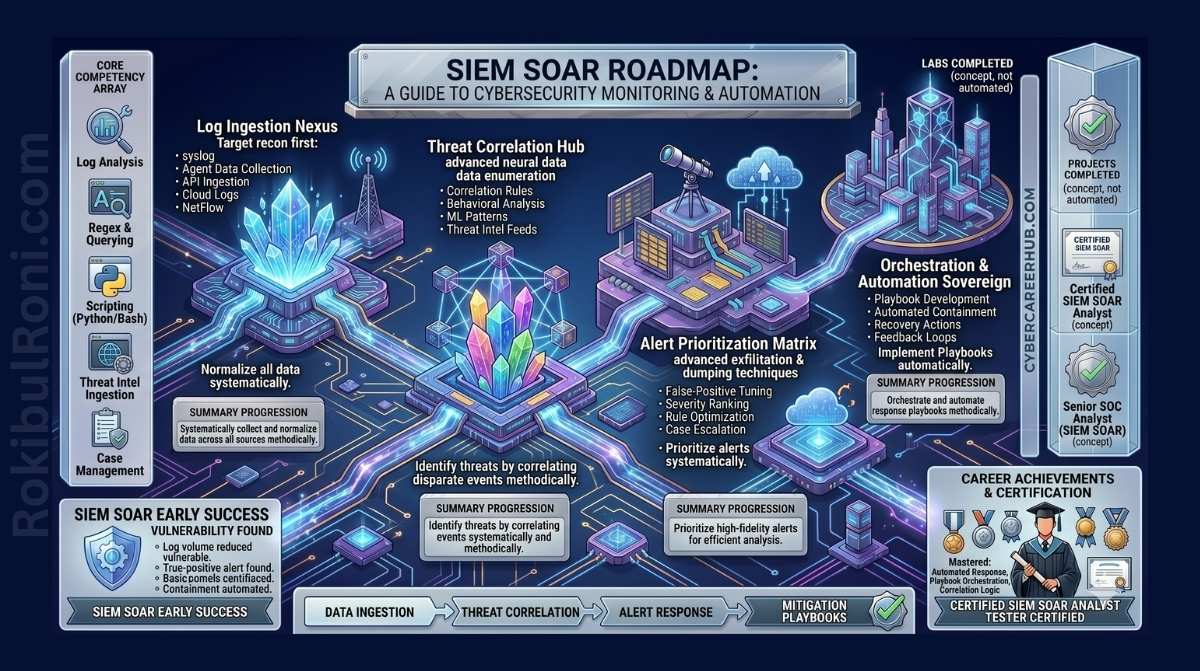
If you’ve spent any time in security operations, you’ve probably heard both terms thrown around — sometimes interchangeably, which is a problem because they’re not the same thing. SIEM and SOAR solve different problems, and understanding where each one fits is essential if you’re building out a security operations capability that actually works.
Let’s start with the reality most security teams are living in. Enterprise networks are generating enormous volumes of log data around the clock — from firewalls, endpoints, cloud workloads, identity systems, and dozens of other sources. Threat actors aren’t waiting for business hours, and they’ve gotten very good at blending in: living off the land, moving laterally for weeks before anyone notices, and exploiting the gap between detection and response.
The two tools built to close that gap are SIEM (Security Information and Event Management) and SOAR (Security Orchestration, Automation, and Response). If you’re trying to decide which one to invest in — or wondering whether you need both — this guide breaks it all down.
Table of Contents
- The Modern Threat Landscape
- What Is SIEM?
- What Is SOAR?
- Core Differences: SIEM vs. SOAR
- When to Choose SIEM
- When to Choose SOAR
- Using SIEM and SOAR Together
- Implementation Best Practices
- Common Pitfalls
- FAQs
- Conclusion
The Modern Threat Landscape
The old model of perimeter defense — firewall plus antivirus, and you’re done — stopped being adequate years ago. Today’s threat actors use Advanced Persistent Threats (APTs), ransomware-as-a-service operations, and supply chain attacks. They’re patient. They get in, stay quiet, and move slowly to avoid triggering alerts.
To catch this kind of activity, you need visibility across your entire environment — endpoints, networks, cloud, identity providers, everything. But that visibility comes with a cost: alert fatigue. When analysts are triaging thousands of alerts a day, the genuinely dangerous ones start to disappear into the noise. That’s the problem both SIEM and SOAR were built to address, just from different angles.
What Is SIEM?
SIEM is the centralized brain of a security operations center. It pulls in log data from across your environment — firewalls, IDS/IPS, EDR agents, cloud infrastructure, authentication systems — normalizes it into a consistent format, and applies correlation rules and analytics to find patterns that suggest something’s wrong.
✨ Core Functions of a SIEM
- Log Aggregation & Normalization: Takes raw logs from dozens of different systems and translates them into a uniform format you can actually search and analyze.
- Threat Detection & Correlation: Connects dots between events that look unrelated in isolation — like multiple failed logins across different systems followed by a successful one from an unusual IP address.
- Compliance & Auditing: Maintains tamper-evident log archives and generates the reports you need for PCI-DSS, HIPAA, GDPR, and similar frameworks.
Why SIEM Matters
- Unified visibility: You can’t investigate what you can’t see. A SIEM brings everything into one place so analysts aren’t jumping between five different consoles to piece together an incident.
- Threat hunting: Good SIEM platforms let you query historical data to go looking for adversaries who’ve already slipped past your initial defenses.
- Forensic record: When an incident does happen, the SIEM becomes your source of truth for reconstructing exactly what occurred and when.
What Is SOAR?
If SIEM is the detection layer, SOAR is the response layer. Where SIEM tells you something looks wrong, SOAR does something about it — automatically, at machine speed.
SOAR works by connecting your security tools via APIs and executing predefined workflows called playbooks when specific conditions are met. Instead of an analyst manually querying threat intel, checking Active Directory, sending an email, and writing a ticket — SOAR handles all of that in seconds.
The idea behind SOAR: Automate the high-volume, repetitive work so your analysts can focus on the threats that actually need human judgment.
What SOAR Does Well
- Orchestration: Ties together your EDR, firewall, identity provider, ticketing system, and threat intelligence feeds so they all work as a coordinated system rather than isolated tools.
- Automated Playbooks: When a phishing alert fires, a SOAR playbook can automatically extract indicators of compromise, check them against threat intelligence, pull the email from all affected inboxes, and suspend the compromised account — all without anyone touching a keyboard.
- Case Management: Gives your team a central place to track active investigations, collaborate, and document findings so nothing falls through the cracks.
Core Differences: SIEM vs. SOAR
They complement each other, but they’re doing fundamentally different jobs:
| Feature | SIEM | SOAR |
|---|---|---|
| Primary Goal | Log aggregation, correlation, and threat detection | Alert triage, automated response, and workflow orchestration |
| Data Handling | Ingests raw log data from across the enterprise | Ingests alerts (often from SIEM) and threat intelligence feeds |
| Output | Alerts, dashboards, and compliance reports | Automated containment actions and incident tickets |
| Analyst Role | Analysts investigate and respond to alerts manually | Automates the initial triage and containment steps |
| Compliance Focus | Strong focus on log retention and regulatory reporting | Focused on operational efficiency and reducing response time |
When to Choose SIEM
For most organizations, SIEM comes first. It’s the foundation everything else builds on. You should prioritize it if:
- You don’t have centralized visibility: If your analysts are logging into separate consoles for the firewall, EDR, and cloud portal to investigate a single incident, you need a SIEM.
- Compliance is a requirement: Regulatory frameworks like PCI-DSS, HIPAA, and SOC 2 require log retention and audit trails. A SIEM handles this automatically.
- You need reliable detection before automation: SOAR is only as good as the alerts it acts on. If your detection is noisy or unreliable, automating responses will just automate the wrong things. Get detection right first.
When to Choose SOAR
SOAR is a force multiplier — but it works best when you already have solid detection in place. Consider investing in SOAR when:
- Your team can’t keep up with alert volume: If your SIEM is generating more alerts than your analysts can realistically triage, SOAR can handle the obvious false positives automatically and escalate only what needs a human.
- Response times are too slow: Manual containment — blocking a domain, isolating a host, disabling a compromised account — can take hours. SOAR does it in seconds.
- Consistency is a problem: When different analysts handle the same type of incident differently, you get gaps. SOAR enforces the same playbook every time, reducing human error.
Using SIEM and SOAR Together
These tools aren’t competitors — they’re designed to work together. Think of SIEM as the radar that detects the incoming threat, and SOAR as the automated system that responds to it.
Here’s what that looks like in practice:
- The SIEM correlates a suspicious lateral movement pattern — multiple internal hosts being accessed from a single account in quick succession — and fires a high-severity alert.
- The SOAR picks up that alert, runs a playbook to enrich it with VirusTotal lookups and Active Directory context, determines the account behavior is anomalous, automatically isolates the affected machine from the network, and opens an urgent ticket for the SOC team with all the evidence already collected.
The net result: your MTTD (Mean Time to Detect) and MTTR (Mean Time to Respond) both drop significantly — and those are the metrics that determine how much damage a breach actually does.
Implementation Best Practices
SIEM and SOAR deployments fail more often than they should, usually because teams try to do too much too fast:
- Start with high-value sources, not everything: For SIEM, begin with Domain Controllers, firewalls, and your EDR. Don’t try to ingest every log on day one. For SOAR, pick one or two repetitive workflows — phishing triage is a common starting point — and automate those before expanding.
- Data quality beats data quantity: A SIEM is only as useful as the data going into it. Make sure your logs are properly formatted and normalized before you start writing correlation rules.
- Tune continuously: A SIEM isn’t a set-and-forget tool. Correlation rules need regular attention — suppressing false positives, adapting to new attacker techniques, and aligning with the MITRE ATT&CK framework as your threat model evolves.
- Use human-in-the-loop automation early on: When you start deploying SOAR, don’t automate destructive actions right away. Have the playbook collect and surface all the relevant data, then present the analyst with a simple “Approve / Deny” decision. Build trust in the automation before letting it act fully autonomously.
Common Pitfalls
- Expecting these tools to run themselves: Neither SIEM nor SOAR maintains itself. Both require dedicated engineering time to keep integrations current, update playbooks, and write new detection rules. Budget for that work.
- Ignoring API rate limits: SOAR relies on APIs to talk to other tools. In a busy incident, playbooks can trigger hundreds of API calls quickly. If you haven’t accounted for rate limits, automated responses will silently fail when you need them most.
- Over-investing in tools, under-investing in people: Expensive platforms don’t protect you if no one has the skills to operate them effectively. Hiring and training analysts matters as much as the technology budget.
Frequently Asked Questions
Does SOAR replace SIEM?
No. SOAR depends on the alerts that SIEM generates to trigger its automated workflows. Without solid detection from a SIEM, SOAR has nothing to act on.
Can smaller organizations afford these tools?
Enterprise SIEM/SOAR platforms can be expensive, but there are options. Many MSSPs offer managed SIEM/SOAR services priced for SMBs. Microsoft Sentinel is worth evaluating — it combines SIEM and SOAR capabilities in a single cloud-native platform with consumption-based pricing that scales with your actual usage.
Where does XDR fit in?
Extended Detection and Response (XDR) is a newer category that tightly integrates endpoint, network, and cloud telemetry with built-in analytics and automated response. It overlaps with SIEM/SOAR in some areas. Larger enterprises typically keep SIEM/SOAR for comprehensive, vendor-neutral log aggregation and complex orchestration, while using XDR as a high-fidelity detection engine on top of it.
Conclusion
The question isn’t really SIEM or SOAR — it’s about building the right foundation and then expanding from there.
Start with SIEM to establish visibility and reliable detection. Once you have that working well and your team is drowning in alert volume, bring in SOAR to automate the repetitive work and give your analysts back their time for the things that actually require human judgment.
The organizations that get this right aren’t necessarily the ones with the most sophisticated tools — they’re the ones that implement them thoughtfully, invest in the people running them, and keep refining their approach as the threat landscape changes.
