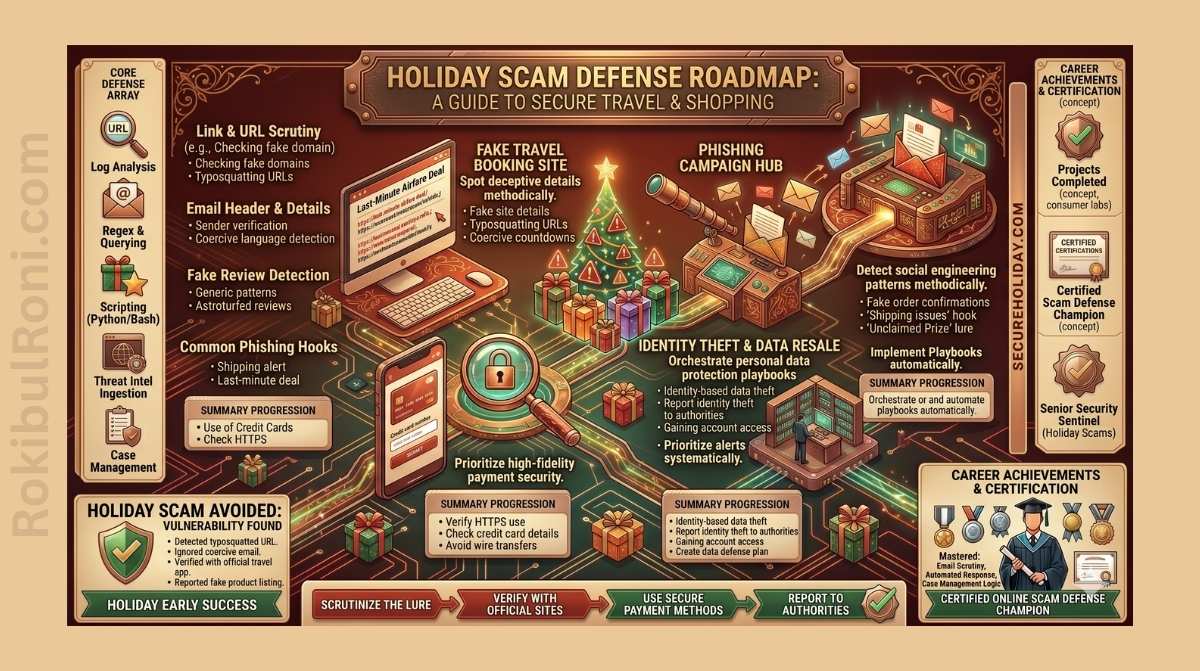
The Holiday Cybersecurity Guide: Staying Safe Amid Festive Shopping Frenzy
The holiday season brings out the best in online shopping—and the worst in cybercriminals. While families are busy hunting for deals and managing gift lists, threat actors are running their own campaigns, carefully timed to take advantage of distracted, time-pressured shoppers.
It’s not a coincidence. The spike in online transactions, the flood of order confirmations and delivery notifications, and the sheer cognitive load of the season create exactly the conditions that social engineering attacks thrive in. Incidents of exposed cloud storage leaking millions of payment card details—often traced back to a single misconfigured Amazon S3 bucket—are a recurring reminder that sensitive data can end up in the wrong hands through surprisingly mundane operational failures.
How These Breaches Actually Happen
The anatomy of a holiday data breach tends to follow a familiar pattern. It often starts with an Amazon S3 bucket—a cloud storage resource—left open to the public without authentication controls. Automated scanners run by threat actors sweep the IPv4 address space continuously, looking for exactly this kind of low-hanging fruit.
When they find an exposed bucket, what’s inside can be staggering: terabytes of screenshots captured in real time as users entered billing addresses, passwords, and payment details on spoofed websites. Security researchers investigating these incidents have identified two primary techniques behind the data collection:
-
Infostealers: Lightweight malware—such as RedLine, Vidar, or Lumma Stealer—distributed through cracked software downloads, fake browser update prompts, or phishing attachments. Once running on a device, they silently harvest browser autofill data, saved cookies, active session tokens, and screenshots, then send everything to an attacker-controlled server.
-
Adversary-in-the-Middle (AiTM) Phishing Kits: Polished landing pages that mirror trusted retail and banking brands, proxying login requests in real time. This technique doesn’t just steal credentials—it captures the active session token issued after a successful MFA verification, letting attackers bypass two-factor authentication entirely.
Why Attackers Target the Holiday Season
Cybersecurity isn’t only a technical problem. Understanding why these campaigns succeed requires understanding a bit of human psychology.
During the holiday period, a few specific conditions work in attackers’ favour:
- Cognitive overload: Shoppers are juggling gift lists, travel plans, and year-end work obligations simultaneously. Under that kind of mental load, people are significantly more likely to miss subtle warning signs—a slightly off domain name, an unexpected sender address, a URL that doesn’t quite match the brand it’s impersonating.
- Artificial urgency: Flash sales, low-stock alerts, and countdown timers have trained shoppers to act quickly. Phishing campaigns deliberately mimic these patterns to short-circuit the instinct to pause and verify.
- Inbox volume: In December, most people receive dozens of legitimate package tracking notifications, order confirmations, and promotional emails every day. Malicious messages dressed up as FedEx, UPS, or Amazon blend right in.
A Practical Security Checklist for Shoppers
Effective protection during the holidays is less about installing new tools and more about building a few consistent habits. Here’s what actually makes a difference.
1. Upgrade Your Authentication and Password Approach
- Move away from browser-based password managers: Chrome, Edge, and Safari all store credentials locally, and infostealers specifically target these vaults. A dedicated, zero-knowledge password manager like Bitwarden or 1Password encrypts your vault separately, requires its own master password, and isn’t accessible through the same browser process that malware targets.
- Use hardware security keys where possible: SMS and app-based MFA codes can be intercepted or bypassed through SIM swapping and phishing kits. FIDO2/WebAuthn hardware tokens like YubiKeys bind authentication cryptographically to the exact domain in your browser bar—they simply won’t authenticate on a spoofed site, full stop.
2. Protect Your Financial Details
- Use virtual credit cards: Services like Privacy.com, or similar features offered by many banks, let you generate single-use or merchant-locked card numbers. If a fake storefront lifts your virtual card details, the number is useless anywhere else and you can delete it instantly.
- Consider a credit freeze: Placing a freeze with Equifax, Experian, and TransUnion (or your local credit bureaus) is free and prevents anyone from opening new credit accounts in your name without your explicit action to lift it.
- Cover your CVV in the physical world: If you shop in person, placing an opaque security sticker over the three-digit code on the back of your card prevents it from being photographed at the point of sale. RFID/NFC-blocking card sleeves also protect against contactless skimming in crowded spaces.
3. Harden Your Network and Devices
- Use a VPN on public networks: Shopping on free Wi-Fi at a mall, café, or airport exposes you to packet sniffing and man-in-the-middle attacks. Route traffic through a reputable VPN—Mullvad and ProtonVPN are well-regarded options—or use your phone’s mobile hotspot instead.
- Audit app permissions and avoid unofficial APKs: Infostealers targeting Android are frequently bundled into modified versions of popular apps. Avoid sideloading anything from outside official app stores, and periodically review what permissions your existing apps have claimed.
What the Security Community Is Tracking
Professional threat intelligence teams monitor holiday-season attack patterns closely. A few consistent findings from recent years:
| Source | Focus Area | Key Finding |
|---|---|---|
| CISA | Phishing & Ransomware | Issues annual holiday shopping advisories warning of a surge in phishing domains and credential harvesting sites timed to Black Friday and Christmas. |
| KrebsOnSecurity | Social Engineering | Documents the continued growth of SMS-based delivery scams (smishing) that redirect victims to credential-harvesting portals via fake tracking links. |
| Malwarebytes Labs | Infostealer Trends | Tracks a consistent spike in infostealer distribution campaigns during Q4, correlating with increased consumer online shopping activity. |
If You Think You’ve Been Compromised
Acting quickly matters. If you suspect you’ve interacted with a phishing page or that your credentials may have been stolen, here’s the order of operations:
- Lock your cards immediately: Most banking apps let you freeze a card in seconds. Don’t wait—call the fraud department and flag the transaction if you see anything suspicious.
- Change affected passwords: Update the password for any account that may have been compromised. If you reused that password elsewhere, change those too. Credential stuffing tools will test stolen logins across hundreds of popular sites automatically.
- Invalidate active sessions: In your email and social media account security settings, use the option to log out of all other sessions. This revokes any session tokens that an infostealer may have already exfiltrated.
- Run a malware scan: Download a reputable scanner like Malwarebytes and run a full system check. Look specifically for any browser extensions you don’t recognise—these are a common persistence mechanism for credential-harvesting malware.
A Note for Businesses: Cloud Security During Peak Season
This guide isn’t only for individual shoppers. For businesses processing elevated transaction volumes during the holidays, the exposed S3 bucket scenario is a direct operational risk.
- Private by default: Every cloud storage bucket should require explicit configuration to allow any public access. Audit your current buckets and make sure none have drifted to public-readable.
- Automated configuration scanning: Tools like AWS Config, Cloud Custodian, and Scout Suite can continuously scan for misconfigurations and alert on public buckets or unencrypted storage. Manual reviews during your busiest season aren’t enough.
- Targeted staff training: Spear-phishing campaigns specifically targeting finance and IT staff spike during Q4. Brief your team on what those attacks look like and reinforce the out-of-band verification habits that catch them.
Useful Resources to Stay Informed
- Malwarebytes Labs – Consumer malware trends and practical analysis: malwarebytes.com/blog
- KrebsOnSecurity – Investigative cybercrime reporting: krebsonsecurity.com
- CISA Alerts – Official US government security advisories: cisa.gov
Staying safe online during the holidays doesn’t require becoming paranoid—it requires being deliberate. Before you click on an incredible deal or an urgent delivery notice, spend five seconds checking the URL, verifying the sender, and making sure your defences are in place. That small habit, consistently applied, makes an enormous difference.
Have a safe and secure holiday season.
This guide was written by Rokibul Islam, a cybersecurity specialist. Originally published on RokibulRoni.com, it aims to give both consumers and businesses the practical knowledge needed to navigate modern threats.
