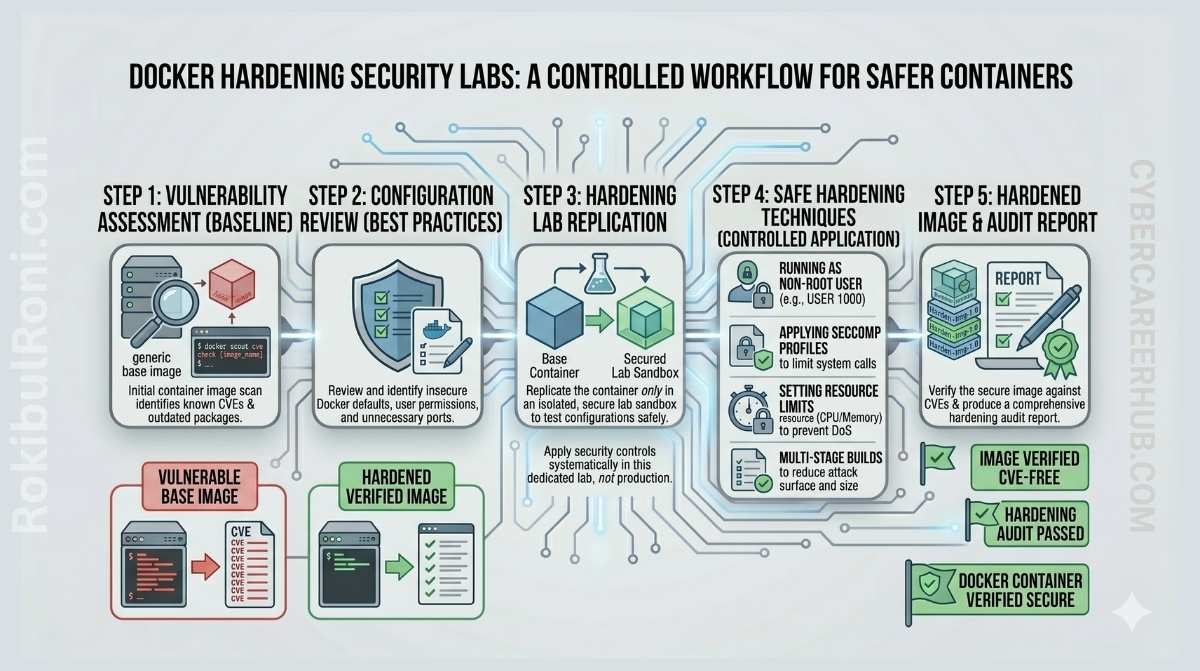
Docker has become the default way to build security labs. Spin up a vulnerable web app in thirty seconds, reset it cleanly when you’re done, run five different tools side by side without polluting your host OS — it’s genuinely great for hands-on practice.
The problem is that Docker’s defaults are designed for developer convenience, not security lab containment. A container that escapes its isolation boundaries in a lab environment can access your host filesystem, your home network, or cloud credentials you didn’t think were at risk. That’s an uncomfortable incident to explain to yourself, let alone a team.
This guide covers the hardening steps that actually matter for lab environments — how to keep your experiments contained, your host safe, and your setup recoverable when something goes sideways.
Why Docker works so well for security labs
Before getting into hardening, it’s worth being clear about why Docker is the right tool here:
- You can spin up vulnerable apps and defensive tooling in minutes, not hours
- Environments are reproducible — the same
docker-compose upgives you the same lab state - Rollback is as simple as destroying a container and rebuilding from a known image
- You can run isolated scenarios side by side without VM sprawl
- Resource control is more granular than most alternatives
The key word is “isolated.” Docker delivers all of these benefits reliably only when you’ve deliberately configured the isolation boundaries.
Where lab setups go wrong
Most Docker security problems in lab environments come from a handful of habits that feel harmless until they aren’t:
| Risk | Bad Lab Habit | Safer Practice | Why It Matters |
|---|---|---|---|
| Privileged mode overuse | Running --privileged by default for everything | Add only the specific Linux capabilities a service actually needs | A privileged container has near-root access to the host kernel |
| Dangerous host mounts | Mounting / or your home directory into a container | Mount specific, scoped paths read-only when possible | A compromised container can read or modify your host files |
| Ports exposed everywhere | Binding all services to 0.0.0.0 | Bind only required ports; use 127.0.0.1 for anything you’re not sharing | Your vulnerable apps shouldn’t be reachable from your router or beyond |
| Stale images | Reusing old images without checking for updates | Pin image versions and refresh on a schedule | Known vulnerabilities in images become real risks during offensive exercises |
| Secrets in compose files | Hardcoding tokens and passwords in YAML | Use environment files, exclude them from version control | Credentials committed to Git are a credential leak |
| Flat lab networking | All containers in one shared network | Segment networks by function — web testing, monitoring, analysis | Cross-scenario contamination is a real problem in shared lab environments |
| No resource limits | Unlimited CPU and memory for all containers | Set per-service resource constraints | Runaway containers or resource-intensive tools can crash your host |
The hardening baseline
Least privilege and runtime safety
The single most impactful change in most lab setups is dropping --privileged mode and running containers as non-root users. Most security tools work fine without kernel-level access. When a tool genuinely needs elevated capabilities — raw packet capture, for example — add the specific Linux capability it needs rather than granting full privilege.
Practical steps:
- Run containers as non-root by specifying a user in your Dockerfile or Compose file
- Drop all capabilities by default with
cap_drop: ALL, then add back only what’s required - Enable
read_only: trueon the root filesystem where feasible (most containers can use writable named volumes for what they actually need to write) - Set
security_opt: - no-new-privileges:trueto prevent privilege escalation inside the container - Avoid
--pid=hostand--network=hostunless a specific scenario requires it
Image hygiene
Images are a common blind spot in lab environments because people tend to pull an image once and reuse it indefinitely. In a security lab context, running tools against a vulnerable app that’s itself running on an outdated image with known exploits is a realistic problem.
- Pin image tags to specific versions rather than using
latest— you want reproducible environments, not whatever was pushed last week - Scan images before regular use with
docker scout cvesor a similar tool - Keep base images minimal; a tool container doesn’t need a full Ubuntu desktop environment
- Remove unused images and dangling layers regularly with
docker image prune
Filesystem and volume controls
Host mounts are convenient and should be used carefully:
- Prefer named volumes over mounting host directories directly
- When you do mount host paths, make them read-only (
ro) unless the container genuinely needs to write there - Never mount sensitive directories like
~/.ssh,~/.aws, or/etcinto lab containers — this is a common way credentials end up exposed - Keep persistent lab data (your notes, captures, results) separate from temporary container artifacts
Network design for security labs
Flat networking — all containers sharing one default Docker network — means a compromised or misbehaving container can talk to everything else in your lab. That’s fine for a quick one-off test, but it becomes a problem when you’re running offensive and defensive scenarios side by side, or when you’re running a vulnerable app alongside a SIEM that has access to your log storage.
A simple zone model works well for most labs:
| Zone | Purpose | Typical Components | Access Rule |
|---|---|---|---|
| Web Test Zone | App testing and API practice | Vulnerable app, test database, web proxy | Expose only required app ports to host |
| Monitoring Zone | SIEM and logging experiments | Wazuh, ELK, Splunk, or Grafana stack | Internal-only; don’t expose log UIs externally |
| Analysis Zone | Packet capture and forensic workflows | Wireshark helpers, log parsers, analysis tools | Limited inbound; controlled outbound |
| Management Zone | Admin and orchestration access | Reverse proxy, admin UIs if needed | Localhost-only or VPN-gated |
This isn’t bureaucracy — it’s genuinely useful. When your attack simulation container is on a separate network from your SIEM, you’re testing realistic detection scenarios rather than just generating noise on a single flat network.
Docker Compose: where most misconfigurations live
Compose is how most labs define their environment, and it’s also where most hardening gaps get introduced. Compose defaults favor convenience, and convenience defaults in security labs often mean overly permissive setups.
| Compose Area | Unsafe Pattern | Safer Pattern |
|---|---|---|
| Ports | "8080:8080" (binds to all interfaces) | "127.0.0.1:8080:8080" for anything that doesn’t need network-wide exposure |
| Volumes | - /:/host or - ~/.aws:/root/.aws | Named volumes or scoped read-only mounts |
| Privileges | privileged: true for convenience | cap_drop: ALL plus specific cap_add for what’s needed |
| Secrets | PASSWORD=supersecret inline in YAML | env_file with .env excluded from version control |
| Networking | Implicit single default network | Explicit named networks segmented by lab function |
| Resources | No limits | mem_limit and cpus set per service |
A good habit: after writing a new Compose file, read it back through the lens of “what happens if this container is compromised?” — that perspective catches a lot of unnecessary exposure.
Lab patterns by learning track
Web testing labs
Keep vulnerable target containers (DVWA, Juice Shop, WebGoat, etc.) isolated on a dedicated network. Route your testing traffic through a proxy container like Burp Suite or OWASP ZAP so you capture everything cleanly. Reset the app container between exercises — don’t carry state from one attack scenario into the next.
SIEM and detection labs
Separate your log generators from your log collectors on different network segments. This lets you test realistic scenarios where the SIEM receives events from isolated sources rather than having everything on one flat network. Use dedicated named volumes for log storage so data doesn’t get mixed between scenarios.
Network analysis labs
Use sample PCAP files or controlled capture sources rather than capturing live traffic from your host interface. If you need live capture for a specific exercise, scope it carefully — packet tools with access to unrestricted host interfaces can capture more than you intend. Document what you’re capturing and why.
Forensics labs
Always work from known-safe disk images and artifacts. Keep your analysis output in a separate volume from your evidence sources — contaminating evidence is a realistic problem even in practice environments. Snapshot your analysis container before running tools that modify state, so you can reproduce your findings.
Resource limits and cleanup: the part everyone skips
Lab containers that aren’t resource-constrained can genuinely destabilize your host. A fuzzer, a log-heavy SIEM stack, or a container running a memory-intensive analysis tool can consume enough resources to crash other containers or make your machine unusable.
Set these early, before you need them:
mem_limitandmemswap_limitin your Compose file for memory-intensive servicescpuslimits for anything that does heavy computation- Log rotation settings for verbose services (without this, log files grow unbounded)
Cleanup routine that keeps your lab healthy:
| Task | Frequency | Purpose |
|---|---|---|
| Remove stopped containers | Weekly | Prevents stale runtime state accumulation |
| Prune unused images and layers | Weekly/bi-weekly | Reduces vulnerability footprint and disk pressure |
| Review exposed ports | Weekly | Catches accidental exposure before it becomes a problem |
| Rotate lab credentials | Monthly | Limits the blast radius of any long-lived credential |
| Verify lab configs are backed up | Monthly | Lets you rebuild quickly after environment corruption |
Common mistakes worth calling out explicitly
A few that come up repeatedly in practice:
Assuming containers are secure by default — Docker provides isolation, not security. The defaults prioritize developer experience, not containment.
Running everything as root because it’s easier — most security tools don’t need root. The ones that do usually need specific capabilities, not full privilege. It’s worth the ten minutes to figure out which one.
Using the same network for offensive and defensive scenarios — if your attack container and your detection stack share a network, you’re not testing detection; you’re just generating events on a flat network with no realistic isolation.
Publishing databases and admin dashboards to 0.0.0.0 — your Wazuh dashboard and your PostgreSQL instance don’t need to be reachable from your router. Bind them to 127.0.0.1.
Storing secrets in compose files that get committed to Git — this happens more often than it should. Use .env files and add them to .gitignore.
Pre-lab hardening checklist
Use this before starting any new lab project:
| Checkpoint | Done |
|---|---|
| Container runs as non-root where possible | ☐ |
| Unnecessary Linux capabilities dropped | ☐ |
| No broad host path mounts without clear scope | ☐ |
| Ports published only as needed; admin UIs on localhost | ☐ |
| Networks segmented by lab function | ☐ |
| Resource limits configured for major services | ☐ |
| Image versions pinned and scanned | ☐ |
| Secrets not hardcoded in compose or YAML files | ☐ |
| Log and data volumes organized by scenario | ☐ |
| Cleanup plan documented before starting | ☐ |
4-week improvement plan for existing lab setups
If you already have a lab environment and want to harden it without rebuilding from scratch:
Week 1 — Baseline and inventory List all running containers, images, volumes, and networks. Identify which containers run privileged or as root. Document current port exposure. This gives you a clear picture of where the risk is.
Week 2 — Containment improvements Segment your networks by function. Reduce host port exposure to only required services. Replace broad host mounts with scoped named volumes. These changes have the highest risk-reduction payoff.
Week 3 — Runtime and image security Convert containers to non-root users where feasible. Add image scanning to your workflow and set an update schedule. Configure resource limits for compute-heavy services.
Week 4 — Compose governance and operations Standardize a secure Compose template for new lab projects. Add a cleanup and credential-rotation schedule. Test your ability to rebuild the lab from documentation alone — this is the real reliability test.
When something goes wrong
Even well-maintained labs have incidents. Having a response plan in place before you need it is the difference between a minor disruption and a real problem.
Common lab safety failures and how to respond:
- Unexpected external exposure of lab services — stop the affected container immediately, identify how the service became reachable, fix the port binding or firewall rule before restarting
- Suspicious host resource spikes from lab workloads — identify the container consuming resources with
docker stats, stop it, investigate before restarting - Accidental secrets in compose files or Git history — rotate the credentials immediately (assume they’re compromised), then clean the Git history if it’s a shared repo
- Unintended network bridge between isolated and personal environments — disconnect the network, audit what traffic may have crossed, rebuild the affected network with correct isolation
After any incident: document what happened, what control was missing, and what you added to prevent recurrence. A lab becomes genuinely useful when you treat your own mistakes as learning material.
Secure Compose starter profile
Instead of re-hardening from scratch every time, keep a secure baseline template you reuse:
| Element | Recommended Default |
|---|---|
| User context | Non-root user specified in image or Compose |
| Privileges | No privileged: true; cap_drop: ALL with minimal additions |
| Filesystem | read_only: true on root where possible; named writable volumes for data |
| Network | Dedicated named networks per project; no implicit default network sharing |
| Port binding | Localhost-only for admin tools; only required ports exposed to host |
| Resources | mem_limit and cpus set per service |
| Logging | Structured output with rotation policy configured |
A reusable template means your fifth lab environment is as well-configured as your first one — and you don’t spend time rediscovering the same hardening steps.
A Docker security lab is only as useful as its isolation is reliable. The tools don’t matter if the environment leaks into your host or collapses under its own resource usage. Get the containment right first, then focus on what you’re there to learn.
