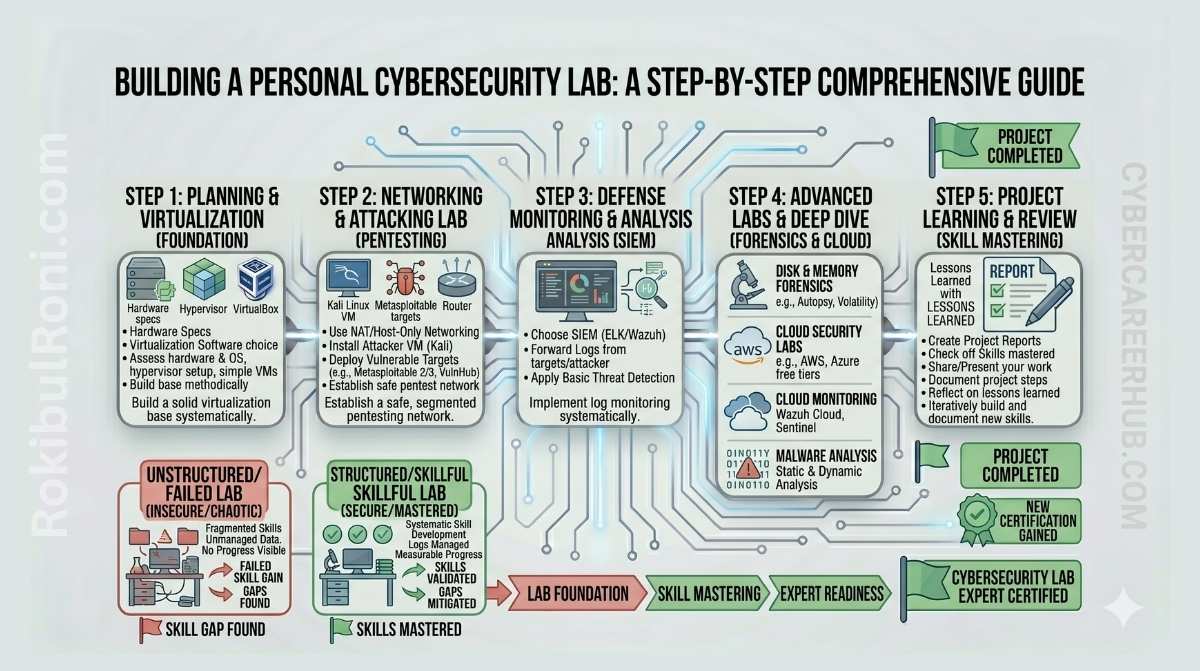
A personal cybersecurity lab is where learning becomes real. It’s your sandbox to experiment safely, write actual findings, and develop repeatable processes across offense and defense.
Don’t aim for the biggest lab—aim for one that’s controlled, legal, stable, and built to last.
Building Your Personal Cybersecurity Lab
Follow this framework to build a safe, functional lab for red teaming, detection, forensics, and cloud security work.
1. Why a Personal Lab Beats Passive Learning
- Turns concepts into repeatable, hands-on skills
- Creates portfolio pieces employers can actually evaluate
- Builds confidence troubleshooting real tools and systems
- Gives you a safe space to break things and learn from failures
- Teaches you how to write findings, document work, and remediate issues
A lab transforms “I watched a tutorial” into “I’ve actually done this and can explain it.”
2. Lab Safety Rules You Enforce From Day One
Safety isn’t optional. Most beginner lab disasters happen from loose boundaries, not sophisticated attacks.
Core Safety Rules
- Keep lab networks completely isolated from your personal and work systems
- Only test on systems you own or have explicit permission to use
- Never point lab tools at live external systems
- Snapshot VMs and containers before you test anything major
- Back up configs, scripts, and documentation regularly
- Set resource limits so lab tests don’t crash your host system
Safety baseline table
| Rule | Why It Matters | Practical Check |
|---|---|---|
| Isolated networking | Prevents accidental spillover to real environments | Verify lab subnet and routing boundaries |
| Owned/authorized targets only | Avoids legal and ethical violations | Maintain target ownership list |
| Snapshot-first workflow | Enables safe rollback after mistakes | Snapshot before each scenario change |
| Backup discipline | Prevents loss of lab build and evidence | Weekly backup verification |
| Resource controls | Prevents host overload and service crashes | Set CPU/memory limits per workload |
3. Lab Architecture: Separate Modular Tracks
Build your lab as distinct, independent tracks so you can focus on one skill at a time and keep things isolated.
Track A: Offensive Testing
What you’ll run:
- Kali or Parrot Linux attacker system
- Vulnerable targets (OWASP Juice Shop, DVWA)
- Practice hosts like Metasploitable in isolated subnets
- Burp Suite and Nmap for scanning
What you’ll learn:
- How to scope and enumerate systems
- Web and API testing workflows
- How to document findings and evidence safely
Track B: Detection and SIEM
What you’ll run:
- Wazuh or the ELK stack (Elasticsearch, Logstash, Kibana)
- Windows and Linux systems sending logs upstream
- Centralized log storage and dashboards
What you’ll learn:
- How to write and tune detection rules
- How to triage alerts and cut false positives
- How to build incident timelines from logs
Track C: Network Analysis
What you’ll run:
- Wireshark for packet inspection
- Optional: SNORT or Suricata IDS for deeper network monitoring
- Sample packet captures to practice on
What you’ll learn:
- Packet analysis and triage workflows
- Protocol anomalies at the network level
- How to write network evidence reports
Track D: Digital Forensics
What you’ll run:
- Autopsy for disk image analysis
- Practice disk images and artifact datasets
- Timeline and browser artifact samples
What you’ll learn:
- Chain of custody discipline
- How to extract artifacts and build timelines
- Writing investigation reports
Track E: Cloud Security
What you’ll run:
- AWS or GCP free-tier sandbox projects
- IAM policy checks and audit log validation
- Edge protection experiments
What you’ll learn:
- How to lock down identities and permissions
- Cloud logging, monitoring, and visibility
- How to find and fix public exposure
4. Hardware and Software: Pick Your Budget
Start lean and only expand when your workflow needs it.
| Setup | Best For | Advantages | Trade-offs |
|---|---|---|---|
| Single laptop | Beginners, students | Cheap, easy to start | Limited CPU/RAM for parallel tracks |
| Mini PC + laptop | Intermediate learners | Better isolation, always-on option | More gear to manage |
| Cloud VMs (hybrid) | Cloud/remote focus | Scales easily, cloud-native practice | Ongoing costs, access management |
| Full homelab server | Advanced labs, many services | High capacity, persistent | Power, heat, complexity, maintenance |
Software You’ll Want
- Virtualization: VirtualBox or VMware for VM isolation
- Containers: Docker and Docker Compose for quick service deployment
- Version control: Git/GitHub for configs and scripts
- Documentation: Markdown for writing findings and runbooks
5. Lab Design Blueprint
| Segment | Purpose | Tools | How It’s Isolated | What You Produce |
|---|---|---|---|---|
| Offensive Testing | Web and host penetration testing | Kali + vulnerable targets + Burp Suite | Separate attack subnet | Pentest reports with screenshots and evidence |
| SIEM | Detection rules and log analysis | Wazuh/ELK + log sources from endpoints | Internal logging network | Detection rules and alert triage notes |
| Network | Packet capture and IDS practice | Wireshark + PCAPs + IDS sensor | Controlled packet capture zone | Network analysis summaries |
| Forensics | Disk and artifact analysis | Autopsy + practice images | Read-only evidence handling | Timeline and artifact reports |
| Cloud | Identity and logging hardening | AWS/GCP sandbox accounts | Separate cloud project | Baseline checklist with gaps identified |
Use this as your design template before you deploy anything.
6. Connecting Tracks Safely
Cross-track workflows feel more real, but they only work if you keep boundaries tight.
Safe Integration Patterns
- Pipe pentest target logs into your SIEM
- Export PCAP files from your network track to analyze in forensics
- Send cloud audit events to your central log aggregation
- Keep management interfaces accessible only from your admin workstation
Boundary Guards
- Give each track its own subnet or network segment
- Document which ports and protocols bridge between tracks
- Tear down temporary bridges after you’re done testing
- Verify no route exists from your lab to outside systems or services
7. Portfolio-Ready Lab Projects
Each project you complete should produce something you can show an employer.
| Project | Track | Your Deliverable |
|---|---|---|
| Test app authorization review | Offensive Testing | Formal pentest report with findings and fixes |
| Build detection rules for web attacks | SIEM | Rule documentation + before/after dashboards |
| Investigate suspicious outbound traffic | Network + SIEM | Case notes correlating packets and logs |
| Reconstruct a user’s browser activity | Forensics | Investigation report with detailed timeline |
| Harden cloud account baseline | Cloud | Checklist of issues with prioritized fixes |
| Simulate a mini incident end-to-end | Multi-track | Timeline, containment actions, and lessons learned |
Good portfolio projects show your method, include evidence, and reflect what you learned.
8. Mistakes to Avoid
- Building lab networks that leak to the internet and expose vulnerable services
- Trying to master five tools at once before understanding the fundamentals
- Skipping documentation—no runbooks, no way to rebuild
- Never cleaning up, so your lab becomes unstable and unmaintainable
- Running drills but never writing them up
- Using real personal data in your practice environments
Self-Imposed Limits That Work
- Add one major tool per month—no more
- Write up every project, even the small ones
- Review and clean up weekly
- Update your architecture diagram after major changes
9. Documentation and Operational Discipline
A lab worth keeping is one you can rebuild and explain.
Documents You Need
- Architecture diagram – Updated whenever major changes happen
- Asset inventory – List of all VMs, containers, and their purposes
- Network diagram – Subnets, trust boundaries, and bridge points
- Runbook – Step-by-step for starting, stopping, resetting, backing up, and restoring
- Finding template – Consistent format for writing up issues and incidents
- Lessons log – Notes from each project about what worked and what didn’t
Operational Tasks
| Job | How Often | Who Does It |
|---|---|---|
| Snapshot systems before testing | Before major changes | You |
| Back up configs and documentation | Weekly | You |
| Check what services are exposed | Weekly | You |
| Remove old containers and VMs | Weekly or biweekly | You |
| Test your restore process | Monthly | You |
| Update architecture docs | Monthly or after big changes | You |
10. 4-Week Beginner Lab Build
Week 1: Set Up Your Foundation
- Build the hypervisor or container host
- Create isolated network segments (at least two tracks)
- Deploy a vulnerable web app and a logging server
Your output: architecture diagram and setup checklist
Week 2: Add Visibility and Detection
- Stand up Wazuh, ELK, or a similar SIEM
- Forward logs from your targets and systems
- Create your first dashboard and a basic detection rule
Your output: verified log ingestion and your first detection rule
Week 3: Run Your First Exercise
- Execute one realistic pentest scenario on your target
- Capture and document the evidence
- Find at least one event in your SIEM timeline
Your output: short pentest report and a log correlation note
Week 4: Extend to Forensics and Cloud
- Run one forensics timeline or artifact recovery exercise
- Set up a simple cloud security baseline checklist
- Document your full lab runbook and cleanup process
Your output: complete lab runbook and your first portfolio artifact bundle
11. Lab Maturity Progression
| Level | What It Looks Like | What Comes Next |
|---|---|---|
| Level 1: Starter | One or two tracks, basic separation, mostly manual | Document and automate repeatable parts |
| Level 2: Structured | Multiple tracks, logging everywhere, evidence discipline | Add automation and tune detection rules |
| Level 3: Integrated | Tracks working together, you can simulate incidents | Focus on your specialty, build deeper projects |
| Level 4: Professional | Polished case studies, clean reports, interview-ready | Tailor projects to your target role |
Progress happens through consistency, not complexity.
A cybersecurity lab that moves your career is one that stays safe, stays modular, stays documented. Ethics first, reproducible workflows second, professional-grade outputs every month.
Lab Operations Roadmap
| Area | Owner | First Step | Success Looks Like |
|---|---|---|---|
| Safety | You | Document isolation and approved targets | No unauthorized testing happens |
| Integration | You | Plan which tracks connect and how | Realistic cross-track investigations work |
| Documentation | You | Update runbooks and diagrams after changes | You can rebuild the lab from docs alone |
| Portfolio | You | Turn each project into a writeup | You have five polished, publishable artifacts |
Your Weekly Checklist
- Verify what services are exposed to the network
- Snapshot your systems before major tests
- Back up configs, scripts, and all documentation
- Clean up and close old tasks
Your Lab Artifacts and Portfolio Pack
| Artifact | What to Include | Who Sees It |
|---|---|---|
| Architecture doc | Segments, systems, tools, trust boundaries | You, collaborators, potential employers |
| Project workbook | Scenario goal, setup, steps, evidence | Your portfolio and learning review |
| Report | Timeline, impact, remediation, retest | Career evidence, interviews |
| Backlog | Known gaps, priorities, next steps | Your next quarter’s planning |
Quality Test Yourself
- Could someone rebuild the lab from your docs alone?
- Are your findings clear enough for a third party to understand?
- Did you turn lessons learned into actual lab improvements?
Your 90-Day Lab Capability Plan
Days 1–30: Build and Document
- Secure your lab’s baseline isolation and controls
- Complete one realistic scenario end-to-end
- Publish v1 of your architecture diagram and runbook
Days 31–60: Cross-Track Integration
- Connect your tracks (pentest findings → SIEM detection → forensics recovery)
- Build repeatable templates and basic automation
- Create and polish one case study for your portfolio
Days 61–90: Realistic Incident Simulation
- Run a multi-track incident response exercise
- Grade your speed and report quality, then improve
- Document next quarter’s specialization focus
Metrics That Matter
| Metric | What It Shows |
|---|---|
| Scenarios you can rerun from docs | Your documentation and setup quality |
| Minutes to rebuild your lab | How resilient your setup is |
| Portfolio projects completed | Your career output consistency |
| Safety issues | Whether you’re maintaining isolation |
A mature lab is one where safety, reproducibility, and documentation happen as habits, not special projects.
Maintenance, Safety, and Reproducibility
The difference between a toy lab and a professional lab is discipline: you can rebuild it, explain every part, and keep it secure.
Your Maintenance Schedule
| Task | When | What You Produce |
|---|---|---|
| Patch host OS and hypervisor | Monthly | Release notes and planned downtime |
| Update tools and images | Monthly | Version log |
| Check what’s exposed | Weekly | “Nothing exposed” confirmation |
| Back up important configs | Monthly | Restorable backup file |
Safety Habits
- Keep the lab completely separate from your personal devices.
- Don’t expose lab services to the internet.
- Use test data and fake accounts—never real data.
- Keep a running list of what’s running and why (stops you from forgetting stale services).
Rebuild-From-Scratch Standards
- Keep a single “lab inventory”: all VMs/containers, their roles, IP ranges, purposes.
- Store all configs and notes in version control.
- Write quick runbooks for starting, stopping, resetting, and restoring.
A professional lab is one you can maintain predictably, operate safely, and rebuild from documentation.
